
一、前言
最近深入探究了一个关于 Monaco Editor Keybinding(快捷键绑定)的问题,并顺势进行了系统梳理。在正式展开之前,先解答两个基础概念:Monaco Editor 是什么?Keybinding 又是什么?
- Monaco Editor:微软开源的一款代码编辑器,同时也是 VS Code 编辑器的底层核心。它的主体代码与 VS Code 共享(均存放在 VS Code 的 GitHub 仓库中)。
- Keybinding:在 Monaco Editor 中,Keybinding 是实现快捷键功能的底层机制(准确来说是其关键组成部分)。通过该机制,用户可以使用快捷键执行各类操作,例如打开命令面板、切换主题,或者编辑器中的常用快捷指令。
本文聚焦于 Monaco Editor 的 Keybinding 机制。由于源码逻辑较为庞杂,文中展示的代码和流程会进行适当简化。
文中使用的代码版本:
Monaco Editor:0.30.1
VS Code:1.62.1
二、具体示例
先通过一个基于 monaco-editor 的简单示例来直观感受,后续内容将围绕该示例展开讲解。
import React, { useRef, useEffect, useState } from "react";
import * as monaco from "monaco-editor";
import { codeText } from "./help";
const Editor = () => {
const domRef = useRef(null);
const [actionDispose, setActionDispose] = useState();
useEffect(() => {
const editorIns = monaco.editor.create(domRef.current!, {
    value: codeText,
    language: "typescript",
    theme: "vs-dark",
});
const action = {
id: 'test',
label: 'test',
precondition: 'isChrome == true',
keybindings: [monaco.KeyMod.CtrlCmd | monaco.KeyCode.KeyL],
run: () => {
window.alert('chrome: cmd + k');
},
};
setActionDispose(editorIns.addAction(action));
editorIns.focus();
return () => {
editorIns.dispose();
};
}, []);
const onClick = () => {
actionDispose?.dispose();
window.alert('已卸载');
};
return (
);
};
export default Editor;
三、原理与机制
1. 整体概览
从上述示例可以看出,Keybinding 机制的完整流程可分为以下几个关键环节:
- 初始化:启动相关服务,并为 DOM 元素绑定事件监听。
- 注册:将 keybinding(快捷键绑定)和 command(命令)注册到系统中。
- 执行:用户按下快捷键,触发对应的 keybinding 和 command。
- 卸载:清除已注册的 keybinding 和 command,释放资源。
2. 初始化阶段
回到示例中创建 editor 的代码:
const editorIns = monaco.editor.create(domRef.current!, {
value: codeText,
language: "typescript",
theme: "vs-dark",
});
初始化流程如下图所示:
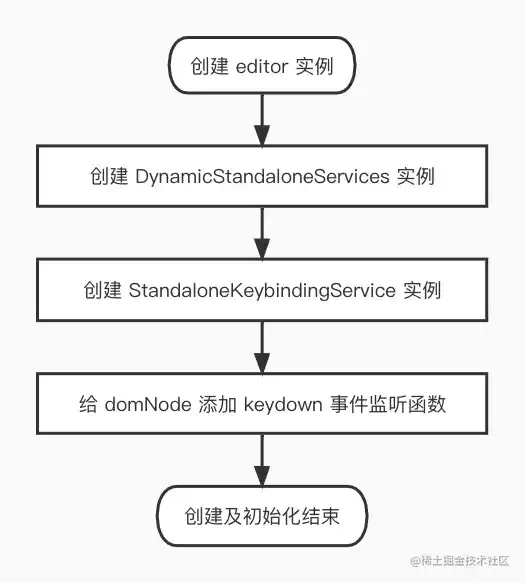
在创建 editor 之前,系统会先初始化服务(services),通过实例化 DynamicStandaloneServices 类来构建所需服务:
let services = new DynamicStandaloneServices(domElement, override);
在 constructor 中,会注册 keybindingService:
let keybindingService = ensure(IKeybindingService, () =>
    this._register(
        new StandaloneKeybindingService(
            contextKeyService,
            commandService,
            telemetryService,
            notificationService,
            logService,
            domElement
        )
    )
);
这里的 this._register 和 ensure 方法,分别将 StandaloneKeybindingService 实例保存到 disposable 对象(用于后续卸载)和 this._serviceCollection 中(用于执行时查找 keybinding)。
实例化 StandaloneKeybindingService 时,会在 constructor 内为 DOM 添加事件监听:
this._register(
    dom.addDisposableListener(
        domNode,
        dom.EventType.KEY_DOWN,
        (e: KeyboardEvent) => {
            const keyEvent = new StandardKeyboardEvent(e);
            const shouldPreventDefault = this._dispatch(
                keyEvent,
                keyEvent.target
            );
            if (shouldPreventDefault) {
                keyEvent.preventDefault();
                keyEvent.stopPropagation();
            }
        }
    )
);
上述代码中的 dom.addDisposableListener 方法,通过 addEventListener 在 domNode 上绑定一个 keydown 事件处理函数,并返回一个 DomListener 实例(包含 dispose 方法用于移除监听)。随后通过 this._register 保存该实例以便后续清理。
3. 注册 keybinding
回到示例中的代码:
const action = {
    id: 'test',
    label: 'test',
    precondition: 'isChrome == true',
    keybindings: [monaco.KeyMod.CtrlCmd | monaco.KeyCode.KeyL],
    run: () => {
        window.alert('chrome: cmd + k');
    },
};
setActionDispose(editorIns.addAction(action));
注册过程如下图所示:
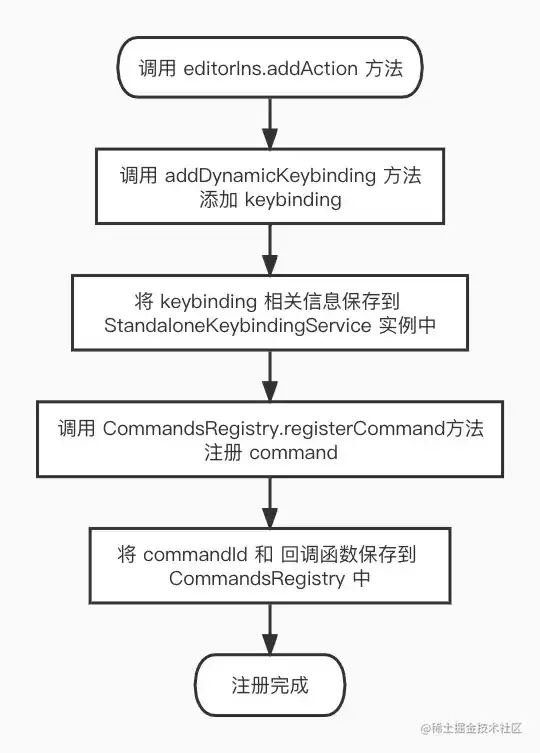
当通过 editorIns.addAction 注册 keybinding 时,会调用 StandaloneKeybindingService 实例的 addDynamicKeybinding 方法:
public addDynamicKeybinding(
    commandId: string,
    _keybinding: number,
    handler: ICommandHandler,
    when: ContextKeyExpression | undefined
): IDisposable {
    const keybinding = createKeybinding(_keybinding, OS);
    const toDispose = new DisposableStore();
    if (keybinding) {
        this._dynamicKeybindings.push({
            keybinding: keybinding.parts,
            command: commandId,
            when: when,
            weight1: 1000,
            weight2: 0,
            extensionId: null,
            isBuiltinExtension: false,
        });
        toDispose.add(
            toDisposable(() => {
                for (let i = 0; i < this._dynamicKeybindings.length; i++) {
                    let kb = this._dynamicKeybindings[i];
                    if (kb.command === commandId) {
                        this._dynamicKeybindings.splice(i, 1);
                        this.updateResolver({source: KeybindingSource.Default,
                        });
                        return;
                    }
                }
            })
        );
    }
    toDispose.add(CommandsRegistry.registerCommand(commandId, handler));
    this.updateResolver({ source: KeybindingSource.Default });
    return toDispose;
}
首先根据传入的 _keybinding 数值创建 keybinding 实例,然后将该实例连同 command、when 等信息存入 _dynamicKeybindings 数组。同时,注册对应的 command——后续触发 keybinding 时将执行此 command。返回的 toDispose 实例用于后续取消对应的 keybinding 和 command。
再来看创建 keybinding 实例的 createKeybinding 方法,它根据传入的数值和操作系统类型生成实例,其大致结构如下(省略部分属性):
{
    parts: [
        {
            ctrlKey: boolean,
            shiftKey: boolean,
            altKey: boolean,
            metaKey: boolean,
            keyCode: KeyCode,
        }
    ],
}
那么,一个简单的数字是如何拆解出所有按键信息的呢?下面详细解读↓↓↓
4. 按键的转换逻辑
首先回顾一下示例中传入的 keybinding 值:
const action = {
    id: 'test',
    label: 'test',
    precondition: 'isChrome == true',
    keybindings: [monaco.KeyMod.CtrlCmd | monaco.KeyCode.KeyL],
    run: () => {
        window.alert('chrome: cmd + k');
    },
};
传入的 keybinding 就是上面 keybindings 数组中的元素。其中 monaco.KeyMod.CtrlCmd = 2048,monaco.KeyCode.KeyL = 42,这些是 monaco-editor 定义的枚举值,与真实 keyCode 存在映射关系。注册时传入的 keybinding 参数为:2048 | 42 = 2090。
先简单回顾 JavaScript 中的位运算(操作的是 32 位带符号二进制整数,以下仅用 8 位示意):
按位与(AND)&
对应位都为 1 则返回 1,否则返回 0。
00001010 // 10
00000110 // 6
--------
00000010 // 2
按位或(OR)|
对应位只要有一个为 1 则返回 1,否则返回 0。
00001010 // 10
00000110 // 6
-------
00001110 // 14
左移(Left shift)<<
将二进制数每位向左移动指定位数,左侧移出的位舍弃,右侧补 0。
00001010 // 10
------- // 10 << 2
00101000 // 40
右移 >>
将二进制数每位向右移动指定位数,右侧移出的位舍弃,左侧用原来最左边的数补齐。
00001010 // 10
------- // 10 >> 2
00000010 // 2
无符号右移 >>>
将二进制数每位向右移动指定位数,右侧移出的位舍弃,左侧补 0。
00001010 // 10
------- // 10 >> 2
00000010 // 2
现在来看,如何从单一数字创建出对应的 keybinding 实例:
export function createKeybinding(keybinding: number, OS: OperatingSystem): Keybinding | null {
    if (keybinding === 0) {
        return null;
    }
    const firstPart = (keybinding & 0x0000FFFF) >>> 0;
    // 处理分两步的keybinding,例如:shift shift,若无第二部分,则chordPart = 0
    const chordPart = (keybinding & 0xFFFF0000) >>> 16;
    if (chordPart !== 0) {
        return new ChordKeybinding([
            createSimpleKeybinding(firstPart, OS),
            createSimpleKeybinding(chordPart, OS)
        ]);
    }
    return new ChordKeybinding([createSimpleKeybinding(firstPart, OS)]);
}
接下来看 createSimpleKeybinding 的实现:
const enum BinaryKeybindingsMask {
    CtrlCmd = (1 << 11) >>> 0, // 2048
    Shift = (1 << 10) >>> 0,   // 1024
    Alt = (1 << 9) >>> 0,      // 512
    WinCtrl = (1 << 8) >>> 0,  // 256
    KeyCode = 0x000000FF       // 255
}
export function createSimpleKeybinding(keybinding: number, OS: OperatingSystem): SimpleKeybinding {
    const ctrlCmd = (keybinding & BinaryKeybindingsMask.CtrlCmd ? true : false);
    const winCtrl = (keybinding & BinaryKeybindingsMask.WinCtrl ? true : false);
    const ctrlKey = (OS === OperatingSystem.Macintosh ? winCtrl : ctrlCmd);
    const shiftKey = (keybinding & BinaryKeybindingsMask.Shift ? true : false);
    const altKey = (keybinding & BinaryKeybindingsMask.Alt ? true : false);
    const metaKey = (OS === OperatingSystem.Macintosh ? ctrlCmd : winCtrl);
    const keyCode = (keybinding & BinaryKeybindingsMask.KeyCode);
    return new SimpleKeybinding(ctrlKey, shiftKey, altKey, metaKey, keyCode);
}
以示例数值为例:keybinding = monaco.KeyMod.CtrlCmd | monaco.KeyCode.KeyL,即 keybinding = 2048 | 42 = 2090。
看代码中的这一行:
const ctrlCmd = (keybinding & BinaryKeybindingsMask.CtrlCmd ? true : false);
运算过程:
100000101010 // 2090 -> keybinding
100000000000 // 2048 -> CtrlCmd
----------- // &
100000000000 // 2048 -> CtrlCmd
再看 keyCode 的运算:
const keyCode = (keybinding & BinaryKeybindingsMask.KeyCode)
100000101010 // 2090 -> keybinding
000011111111 // 255 -> KeyCode
----------- // &
000000101010 // 42 -> KeyL
由此得到 ctrlKey、shiftKey、altKey、metaKey、keyCode 等值,随后利用这些值生成 SimpleKeybinding 实例,该实例包含上述按键信息以及相关操作方法。
至此,keybinding 注册完成——keybinding 实例及相关信息被存入 StandaloneKeybindingService 实例的 _dynamicKeybindings 数组中,对应的 command 也注册到了 CommandsRegistry 中。
5. 执行阶段
当用户按下快捷键时,便会触发 keybinding 对应 command 的执行。整体流程如下:
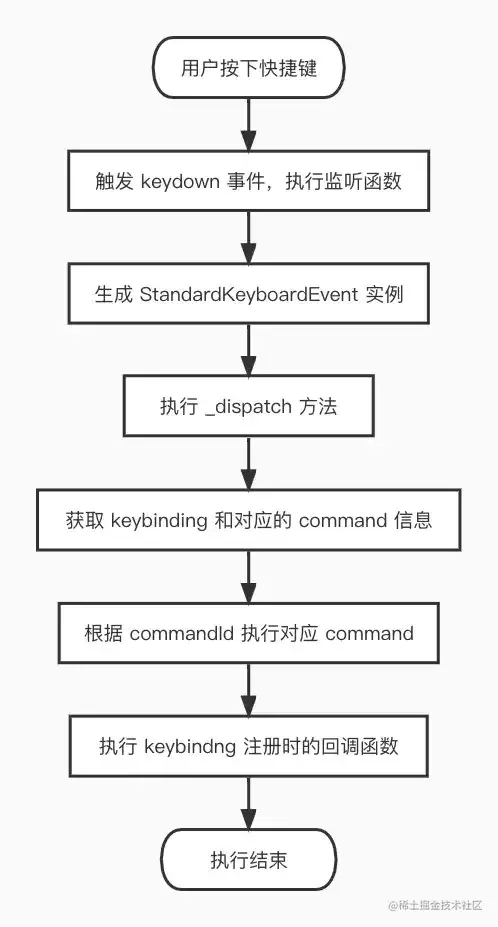
回到 StandaloneKeybindingService 初始化时,已在 domNode 上绑定了 keydown 事件处理函数:
(e: KeyboardEvent) => {
    const keyEvent = new StandardKeyboardEvent(e);
    const shouldPreventDefault = this._dispatch(keyEvent, keyEvent.target);
    if (shouldPreventDefault) {
        keyEvent.preventDefault();
        keyEvent.stopPropagation();
    }
};
当 keydown 事件触发后,先实例化一个 StandardKeyboardEvent,该实例包含按键信息和方法,大致结构如下(省略部分属性):
{
    target: HTMLElement,
    ctrlKey: boolean,
    shiftKey: boolean,
    altKey: boolean,
    metaKey: boolean,
    keyCode: KeyCode,
}
其中 keyCode 是经过转换得到的:由原始键盘事件的 keyCode 映射为 monaco-editor 内部的 KeyCode。转换主要为了兼容不同浏览器,并根据映射关系得出最终值。转换方法如下:
function extractKeyCode(e: KeyboardEvent): KeyCode {
    if (e.charCode) {
        // "keypress" events mostly
        let char = String.fromCharCode(e.charCode).toUpperCase();
        return KeyCodeUtils.fromString(char);
    }
    const keyCode = e.keyCode;
    // browser quirks
    if (keyCode === 3) {
        return KeyCode.PauseBreak;
    } else if (browser.isFirefox) {
        if (keyCode === 59) {
            return KeyCode.Semicolon;
        } else if (keyCode === 107) {
            return KeyCode.Equal;
        } else if (keyCode === 109) {
            return KeyCode.Minus;
        } else if (platform.isMacintosh && keyCode === 224) {
            return KeyCode.Meta;
        }
    } else if (browser.isWebKit) {
        if (keyCode === 91) {
            return KeyCode.Meta;
        } else if (platform.isMacintosh && keyCode === 93) {
            // the two meta keys in the Mac ha ve different key codes (91 and 93)
            return KeyCode.Meta;
        } else if (!platform.isMacintosh && keyCode === 92) {
            return KeyCode.Meta;
        }
    }
    // cross browser keycodes:
    return EVENT_KEY_CODE_MAP[keyCode] || KeyCode.Unknown;
}
得到 keyEvent 实例后,通过 this._dispatch(keyEvent, keyEvent.target) 执行调度:
protected _dispatch(
    e: IKeyboardEvent,
    target: IContextKeyServiceTarget
): boolean {
    return this._doDispatch(
        this.resolveKeyboardEvent(e),
        target,
        /*isSingleModiferChord*/ false
    );
}
直接调用 this._doDispatch 方法,其中 this.resolveKeyboardEvent(e) 处理传入的 keyEvent,返回一个包含多种 keybinding 操作方法的实例。
接下来重点看 _doDispatch 的核心逻辑(只展示关键部分):
private _doDispatch(
    keybinding: ResolvedKeybinding,
    target: IContextKeyServiceTarget,
    isSingleModiferChord = false
): boolean {
    const resolveResult = this._getResolver().resolve(
        contextValue,
        currentChord,
        firstPart
    );
    if (resolveResult && resolveResult.commandId) {
        if (typeof resolveResult.commandArgs === 'undefined') {
            this._commandService
                .executeCommand(resolveResult.commandId)
                .then(undefined, (err) =>
                    this._notificationService.warn(err)
                );
        } else {
            this._commandService
                .executeCommand(
                    resolveResult.commandId,
                    resolveResult.commandArgs
                )
                .then(undefined, (err) =>
                    this._notificationService.warn(err)
                );
        }
    }
}
核心逻辑是找到 keybinding 对应的 command 并执行。_getResolver 方法获取已注册的 keybinding 集合,通过 resolve 方法匹配并返回对应的 keybinding 和 command 信息。执行 command 时,会从 CommandsRegistry 中找到已注册的 command,并执行其 handler 函数(即 keybinding 的回调)。
6. 卸载流程
回到示例中的代码:
const onClick = () => {
    actionDispose?.dispose();
    window.alert('已卸载');
};
卸载过程如下图所示:
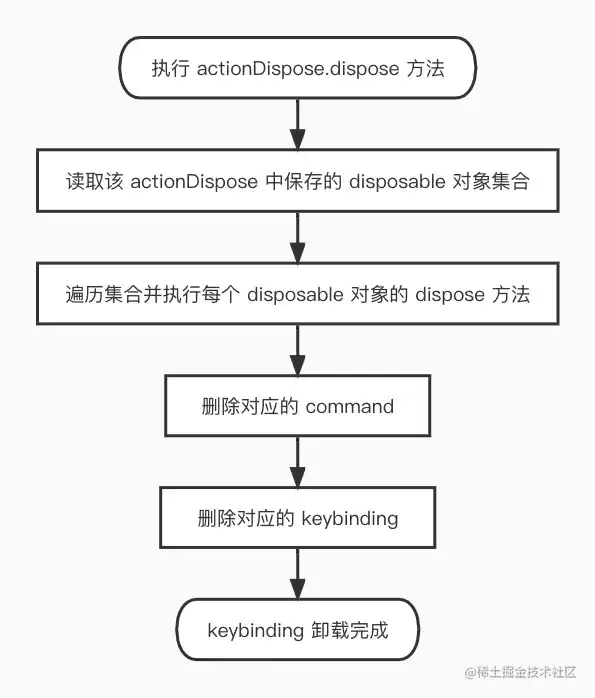
还记得注册时的那句 setActionDispose(editorIns.addAction(action)) 吗?addAction 返回一个 disposable 对象,通过 setActionDispose 将其保存。调用 actionDispose.dispose() 即可卸载该 action,对应的 command 和 keybinding 都会被清除。
四、结语
对 Monaco Editor 的 Keybinding 机制做简要总结:它通过监听用户键盘输入,查找并匹配已注册的 keybinding 和 command,随后执行相应的回调函数。然而,深入每个环节都会发现大量细致的处理逻辑,本文仅做了整体性介绍,许多细节尚未展开。感兴趣的读者可以继续深入探索。


