
Monaco Editor 在 Angular 项目中的集成实践
近期在 Angular 项目开发中,我们使用了 Monaco Editor 代码编辑器,并整理了接入方式。本文将重点介绍关键点与常用 API,帮助开发者快速上手,避免常见陷阱。
安装依赖
如果项目基于 Angular 12 及更早版本,选择 monaco-editor 配合 ngx-monaco-editor 完全可行。但升级到更高 Angular 版本后,使用 npm 安装 ngx-monaco-editor 会报错——原因在于原作者已停止维护,支持仅停留在 Angular 12。
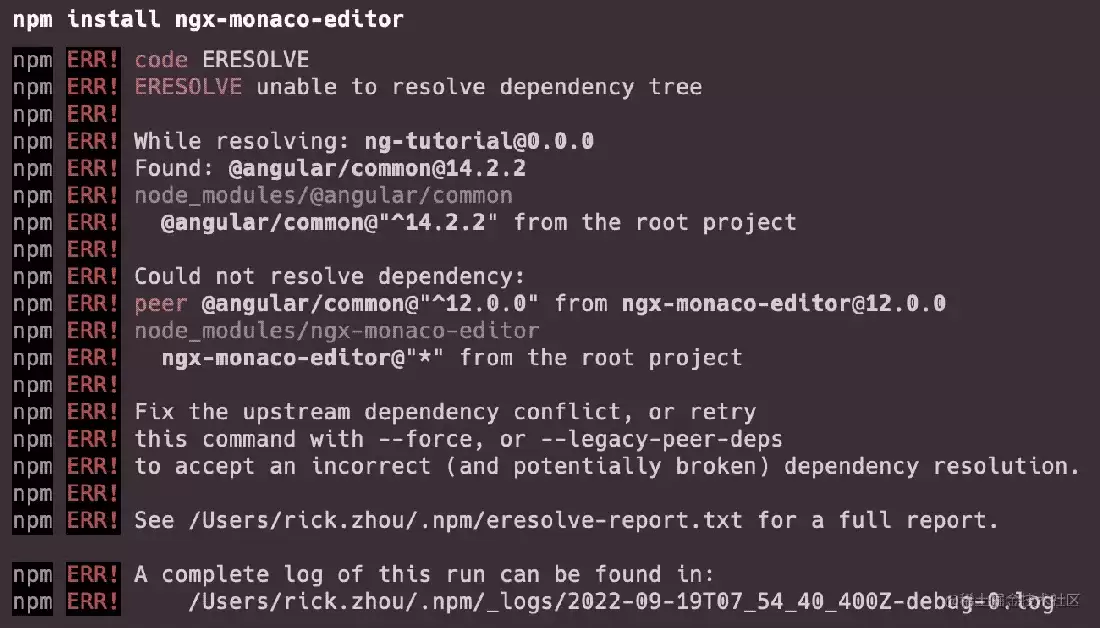
虽然可以通过 --force 或 --legacy-peer-deps 强制安装,但为彻底消除潜在风险,我们在原作者基础上将框架支持提升至 Angular 14,并持续进行维护更新。
推荐使用持续维护的 @rickzhou/ngx-monaco-editor
如果不希望依赖外部包,可直接将以下源文件复制到本地项目中使用:
base-editor.ts(引入 monaco-editor)config.tsdiff-editor.component.tseditor.component.tseditor.module.tstypes.ts
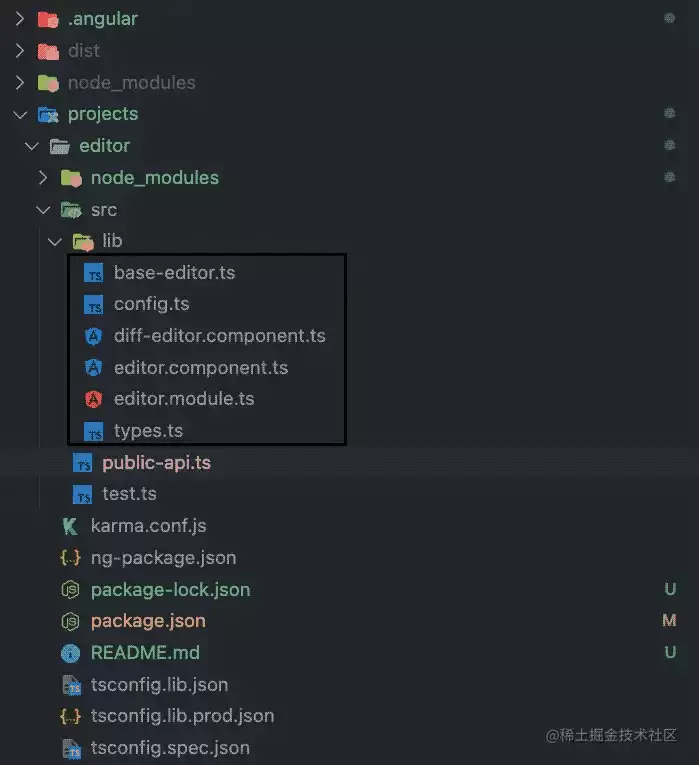
只需将 lib 目录下的这六个文件复制出来,作为项目中的一个 Module 正常引用即可。
使用方式
所有 API 均可在 editor.api.d.ts 中查阅,下面仅记录最常用的几个功能。
- 配置编辑器选项
export const READ_EDITOR_OPTIONS: editor.IEditorOptions = {
  readOnly: true,
  automaticLayout: false,
  minimap: { enabled: false },
  renderFinalNewline: false,
  scrollbar: { vertical: 'visible' },
  mouseWheelZoom: true,
  contextmenu: false,
  fontSize: 16,
  scrollBeyondLastLine: false,
  smoothScrolling: true,
  cursorWidth: 0,
  renderValidationDecorations: 'off',
  colorDecorators: false,
  hideCursorInOverviewRuler: true,
  overviewRulerLanes: 0,
  overviewRulerBorder: false,
};
- 获取编辑器实例
public initViewEditor(editor: editor.ICodeEditor): void {
  this.editor = editor;
}
- 获取当前光标位置
editor.getPosition()
- 获取鼠标选中的文本
editor.getModel().getValueInRange(editor.getSelection());
- 修改光标位置
editor.setPosition({
  column: 1,
  lineNumber: 1,
});
- 滚动指定行至可视区中央
editor.revealLineInCenter(1);
- 绑定事件
editor.onMouseDown(event => {
  // do something
});
editor.onKeyDown(event => {
  // do something
});
- 保存与恢复视图快照
const snapshot = editor.saveViewState();
editor.restoreViewState(snapshot);
- 阻止特定事件(例如搜索快捷键)
function isMac() {
  return /macintosh|mac os x/i.test(navigator.userAgent);
}
editor.onKeyDown(event => {
  if (
    (isMac() && event.browserEvent.key === 'f' && event.metaKey) ||
    (!isMac() && event.browserEvent.key === 'f' && event.ctrlKey)
  ) {
    event.preventDefault();
    event.stopPropagation();
  }
});
以上便是 Monaco Editor 在 Angular 中的基本用法。实际项目中可根据场景灵活组合这些 API,例如动态切换语言、绑定快捷键、同步滚动等,操作并不复杂。只要理清了编辑器实例的获取方式,后续扩展会非常顺畅。


