
MCP协议:大语言模型的革命性连接桥梁
核心内容:
1. MCP协议的定义及其解决的核心问题
2. MCP协议如何实现大模型与外部数据、工具的交互
3. MCP协议的客户端与服务器架构及交互方式
MCP是什么
由 Anthropic 于2024年11月提出的开放协议,旨在解决大语言模型(LLM)与外部数据源、工具的标准化连接问题。
可以这样理解:MCP就像是人的手。如果说大模型模拟的是人类的大脑,那么之前我们与大模型的交互始终停留在对话交流的形态。
但有了MCP之后,大脑的指令就能通过手去做实际的事情了。
这里实际的事情包括但不限于:
- 去淘宝下单购物
- 使用飞猪购买飞机票
- 使用 Blender 软件绘制 3D 工具
- 使用浏览器抓取某个网站
- 使用 Obsidian 查询和记录某个文档
所以MCP首先需要一个client,这个client能处理用户需求、请求大模型,并将大模型返回的信息解析成指令,再根据这些指令来调用MCP服务。
其次,MCP要有一个server,它是封装真实行为能力的服务接口。比如要用Blender软件绘制3D图片,那就需要在本地搭建一个HTTP服务器,调用Blender的各种对外接口来执行绘制,并将这种能力提供给MCP client。
一般来说,MCP的client和MCP的server是在同一台机器上的。
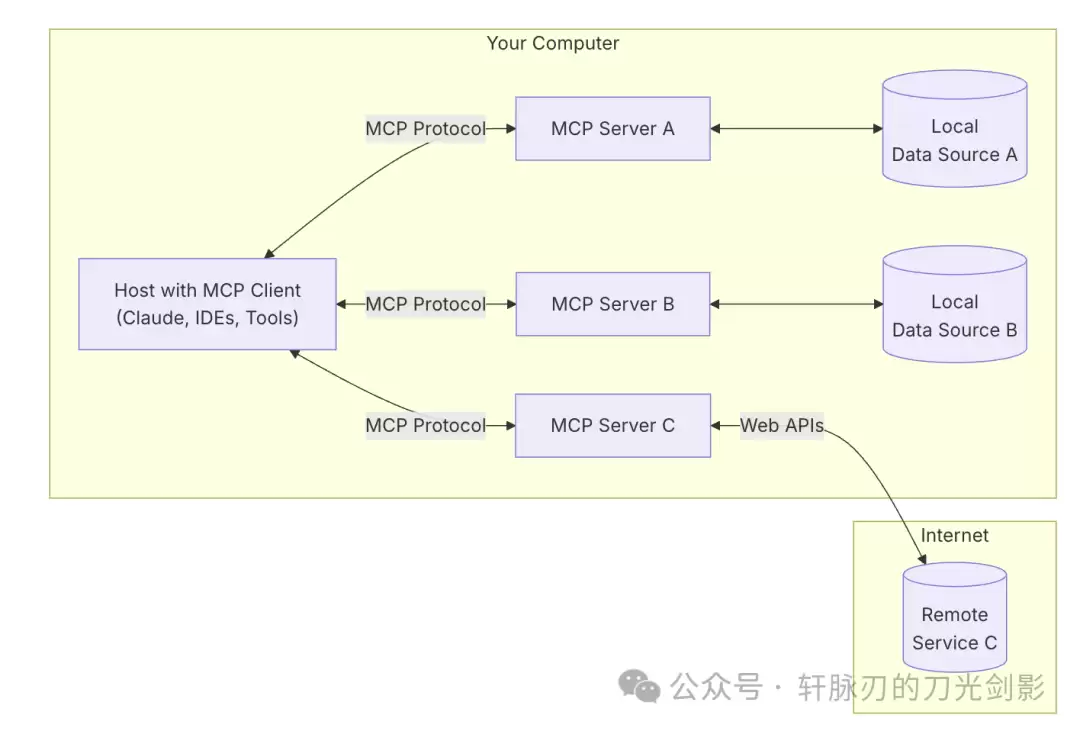
在官网(https://modelcontextprotocol.io/introduction)中,客户端被分为MCP Host和MCP Client,其实是一个意思。Host指的是宿主,比如cursor、Claude app这样的软件,其中与MCP server交互的部分叫做MCP Client。
MCP 协议是怎么交互的
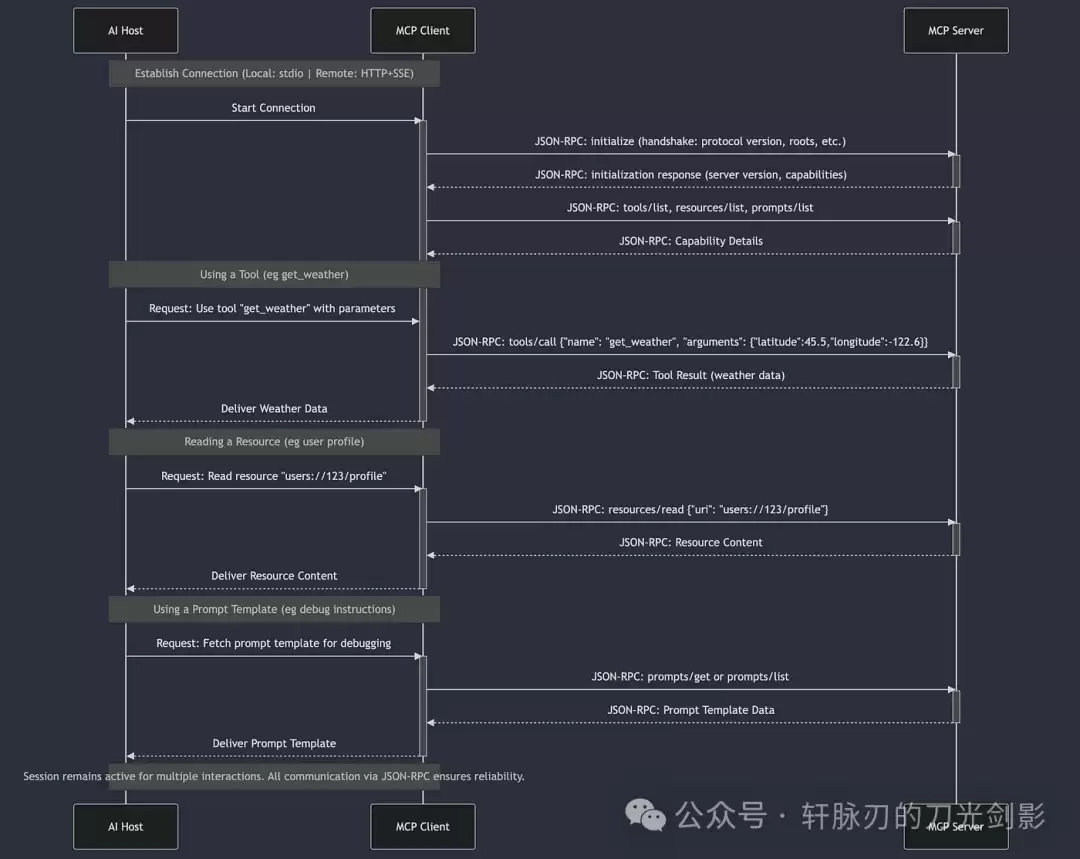
这张图已经把流程讲得很清楚了。
MCP Client和MCP Server交互时,会分别通过 tools/list、resources/list、prompts/list 来获取该MCP Server提供了哪些能力。
其中 tools/list 的接口示例:
{
  "jsonrpc": "2.0",
  "id": 1,
  "result": {
    "tools": [
      {
        "name": "search_arxiv",
        "description": "Search arXiv articles by keyword",
        "inputSchema": {
          "type": "object",
          "properties": {
            "keyword": {
              "type": "string",
              "title": "Search Query"
            },
            "max_results": {
              "type": "integer",
              "minimum": 1,
              "maximum": 50
            }
          },
          "required": ["keyword"]
        }
      },
      {
        "name": "create_issue",
        "description": "Create GitHub issue",
        "inputSchema": {
          "type": "object",
          "properties": {
            "repo": {"type": "string"},
            "title": {"type": "string"},
            "body": {"type": "string"}
          },
          "required": ["repo", "title"]
        }
      }
    ]
  }
}
resources/list 的接口示例:
{
  "jsonrpc": "2.0",
  "id": 2,
  "result": {
    "resources": [
      {
        "uri": "file:///var/log/app.log",
        "name": "Application Logs",
        "mimeType": "text/plain",
        "description": "Real-time server logs"
      },
      {
        "uriTemplate": "postgres://db/users/{user_id}",
        "name": "User Records",
        "mimeType": "application/json",
        "description": "Query user data by ID"
      }
    ]
  }
}
prompts/list 的接口示例:
{
  "jsonrpc": "2.0",
  "id": 3,
  "result": {
    "prompts": [
      {
        "name": "generate_report",
        "description": "Generate technical report template",
        "argumentsSchema": {
          "type": "object",
          "properties": {
            "title": {"type": "string"},
            "sections": {
              "type": "array",
              "items": {"type": "string"}
            }
          }
        }
      },
      {
        "name": "explain_code",
        "description": "Generate code explanation",
        "argumentsSchema": {
          "type": "object",
          "properties": {
            "code": {"type": "string"},
            "language": {"type": "string"}
          },
          "required": ["code"]
        }
      }
    ]
  }
}
通过这几个接口,MCP Client就能利用Server提供的如下功能:
- 调用
tools/search_arxiv获取论文 - 通过
resources/read加载本地参考文献 - 使用
prompts/summarize生成文献综述
如何在本地安装一个MCP Server
官网的 https://modelcontextprotocol.io/quickstart/server 有教程教你如何本地安装一个查看天气的MCP Server。
这个MCP Server提供了两个工具:get-alerts 和 get-forecast。
实测下来,官网的教程是可行的。
有几个官网未曾提及的细节值得注意:
我想调试一下这个MCP服务
使用 mcp 命令:
- 图形化调试工具,可实时测试工具/资源/提示的执行效果
- 启动命令:
mcp dev weather.py(这个命令要在 venv 环境下运行)
(weather) ➜  weather git:(master) ✗ mcp dev weather.py
Need to install the following packages:
@modelcontextprotocol/inspector@0.6.0
Ok to proceed? (y) y

Starting MCP inspector...
Proxy server listening on port 3000

? MCP Inspector is up and running at http://localhost:5173 ?
在本地浏览器打开5173端口,就会出现调试界面。
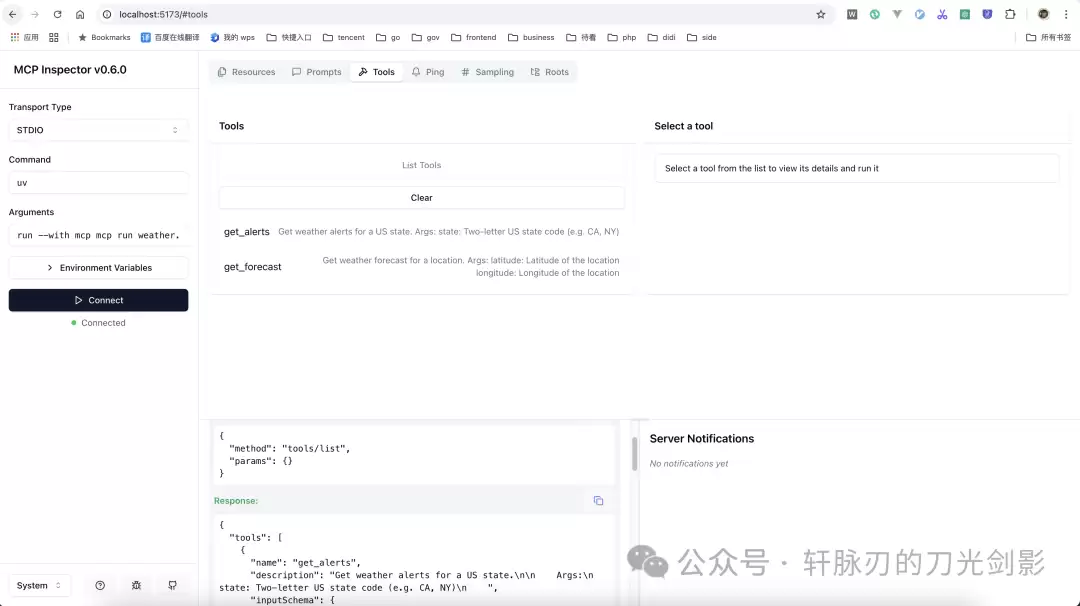
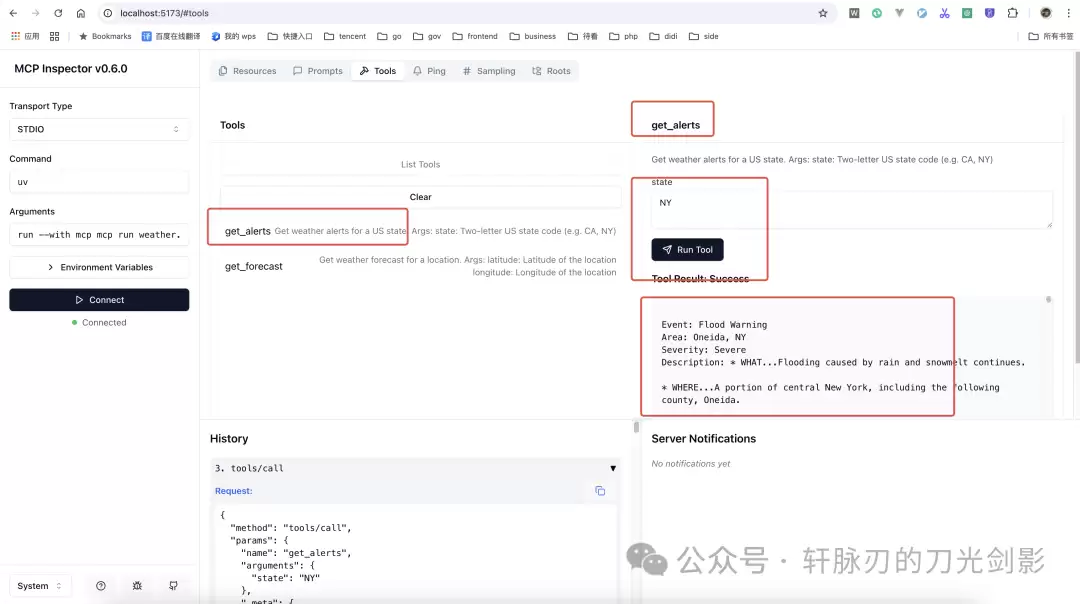
在这个界面上可以很方便地调用某个tool工具。
cursor 工具中如何配置这个MCP Server
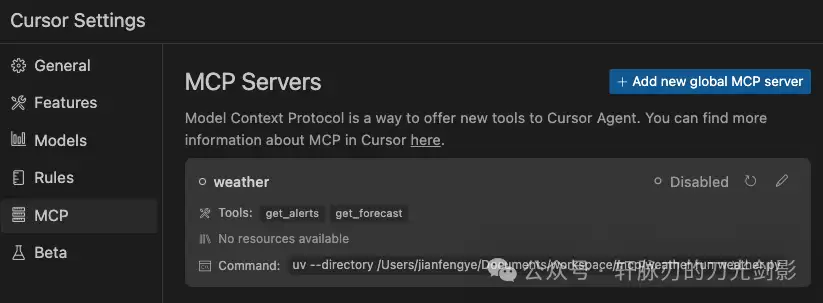
这个MCP Server是通过 uv 命令启动的,配置文件如下:
{
 "mcpServers": {
  "weather": {
   "command": "uv",
   "args": [
    "--directory",
    "/Users/jianfengye/Documents/workspace/mcp/weather",
    "run",
    "weather.py"
   ]
  }
 }
}
在cursor中配置好并启用后,就能看到这个服务提供的tools。
在cursor中使用 @mcp 就可以询问美国纽约的天气。
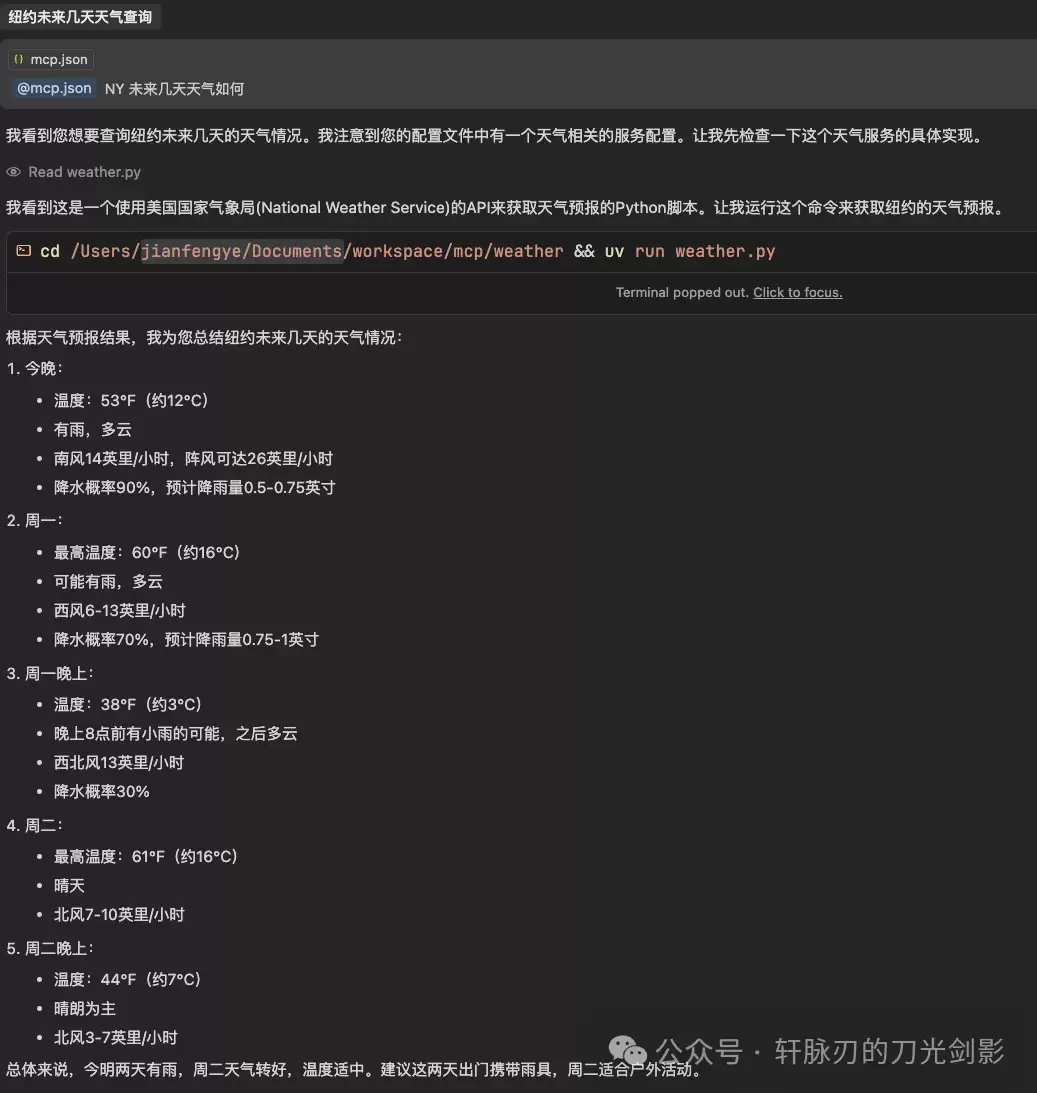
注意:官网给出的接口只能查询美国的天气,所以不要尝试查询中国地区的天气。
有哪些现成的MCP 服务
开源社区有一个:https://github.com/punkpeye/awesome-mcp-servers
还可以访问 https://glama.ai/mcp/servers 进行查询。
Claude 官方也创建了一个MCP Server集中地:https://cursor.directory