
在AIGC(人工智能生成内容)领域,图像生成无疑是一个至关重要的分支,其战略价值怎么强调都不为过。无论是前沿的学术探索,还是商业化的产业落地,这项技术都承载着巨大的期望与潜力。从初代生成对抗网络(GAN)到如今备受关注的扩散模型,每一次技术的迭代都深刻地刷新了我们对“机器作画”能力的认知。当我们将目光投向实际的商业化应用时,生成速度、模型稳定性、可控性、内容多样性,以及数据隐私和知识产权等常被提及的挑战,依然是绕不开的核心议题。
图像生成的实际应用场景远比我们想象的更为丰富。除了平面设计、游戏开发和动画制作这些主流领域,在医学影像合成、化合物结构生成乃至药物发现等前沿科研方向,它也展现出了惊人的潜力。从技术上讲,图像根据颜色和灰度通常可分为二值图、灰度图、索引图和RGB图,而生成模型的核心任务就是实现这些不同类型之间的精准转换。在实际应用中,评判一个模型优劣的关键,最终还是要落到生成质量和图像多样性这两个硬性指标上。
回顾技术演进历程,图像生成大致经历了三个关键发展阶段。首先是GAN称霸的时期,通过生成器与判别器之间的博弈对抗,虽然能产出逼真的图像,但训练稳定性差、模式崩溃等顽疾始终如影随形。随后,自回归模型借鉴了NLP领域的Transformer架构,引入自注意力机制优化了训练过程,在稳定性和合理性上有所提升,但推理速度慢、训练成本高昂又成为了新的瓶颈。直到扩散模型的出现,才真正解决了前代技术的核心痛点——训练稳定性和结果准确性都有了质的飞跃,迅速取代GAN成为业界主流。不过,要满足产业中大量存在的跨模态生成需求,还得依靠CLIP模型作为“桥梁”。它通过海量的文本-图像对进行对比学习,建立起强大的跨模态连接,极大地提升了生成速度和质量。目前市面上表现抢眼的图像生成产品,其底层技术栈基本都是扩散模型加CLIP的组合。
扩散模型的原理其实比较直观:它定义了一个马尔可夫链,持续向数据中添加噪声,直至数据变为纯高斯噪声,然后通过学习反向去噪过程,最终生成目标图像。这种方式类似于一种系统的数据扰动与恢复,每一步都在优化,因此在稳定性和可控性上表现优异。它的核心优势在于能更准确地还原真实数据的分布,对图像细节的保留能力极强,生成的写实效果非常出众,尤其在图像补全修复和分子图生成这类特定任务上表现出色。但它的短板也很明显——采样速度相对较慢,且对数据类型的泛化能力有待加强。
CLIP模型走的则是对比学习的路线。它通过各自的编码器分别提取文本和图像的特征,并将它们映射到同一个表示空间,通过计算相似度和差异度来训练模型。这样一来,模型就能根据给定的文本描述,生成与之高度匹配的图像。CLIP最大的好处在于无需事先对数据进行标注,在零样本分类任务中表现卓越;同时能精准地把握文本描述的语义和图像风格,还能在不影响核心信息的前提下,灵活地改变非必要细节,从而使得生成图像的多样性更胜一筹。不过,CLIP本质上仍是一个分类模型,在处理复杂、抽象的场景时可能存在局限,例如涉及时间序列数据或需要进行推理计算的任务,生成效果可能不太理想。而且,它对大规模、高质量的文本-图像对数据集依赖性强,训练资源消耗也相当可观。
基于扩散模型和CLIP的基础架构,行业里衍生出了一系列高效且易用的开发者工具,极大地加速了AIGC图像生成的生产力与商业化进程。目前,最主流的工作流工具主要集中在ComfyUI和Web UI这两个。Midjourney和Stable Diffusion的官方社区文档中,对这两款工具的特性对比已有详尽描述,这里就不再赘述了。
二、应用场景
将目光聚焦到新能源汽车行业,车联网的互动能力与趣味性,正日益成为车企构建核心竞争壁垒的关键筹码。如今,新能源车企服务车主的方式越来越像互联网公司,通过内容交互进行用户引流,已成为了各家重点攻克的战略方向。一个典型的应用场景是这样的:在节假日,车主进行中短途自驾游时,车联网系统和车载芯片会完整记录下整个旅程信息。基于这些丰富的旅程数据,车企希望利用大模型,在其汽车内容社区中自动生成风格化、个性化的素材,并精准推送给用户。
为了能够最大限度地实现从C端用户的引流,车企对AIGC能力提出了极高的要求。尤其在图像细节生成方面要求严苛:生成的风格化内容能否完全遵循指令?汽车品牌Logo和边缘是否存在色差?背景中的车型能否实现无缝、无违和感的拼接?这些都是考验技术硬实力的地方,丝毫马虎不得。
三、实践落地
3.1 AIGC生图工具选型
面向To C场景的生产环境,ComfyUI虽然学习曲线相对陡峭,但与其他基于Stable Diffusion的运行环境相比,优势依然十分突出。它在SDXL模型推理上做了显著的性能优化,图片生成速度通常比Web UI快10%到25%。其高度自定义的特性,使用户能够更精准、更细粒度地控制整个生成流程,深度用户往往能通过它产出更优质的图片。此外,Workflow以JSON或图片形式进行分享和传播极为便捷,能大幅提升团队协作效率。ComfyUI对开发者也很友好,只需加载相同格式的JSON文件,便可用任何编程语言调用API来生成图片。还有一个关键点是,阿里云的PAI EAS平台基于场景化部署,为ComfyUI提供的版本选择更丰富,部署也更便捷。
ComfyUI的工作流配置页面
3.2 业务流程确认
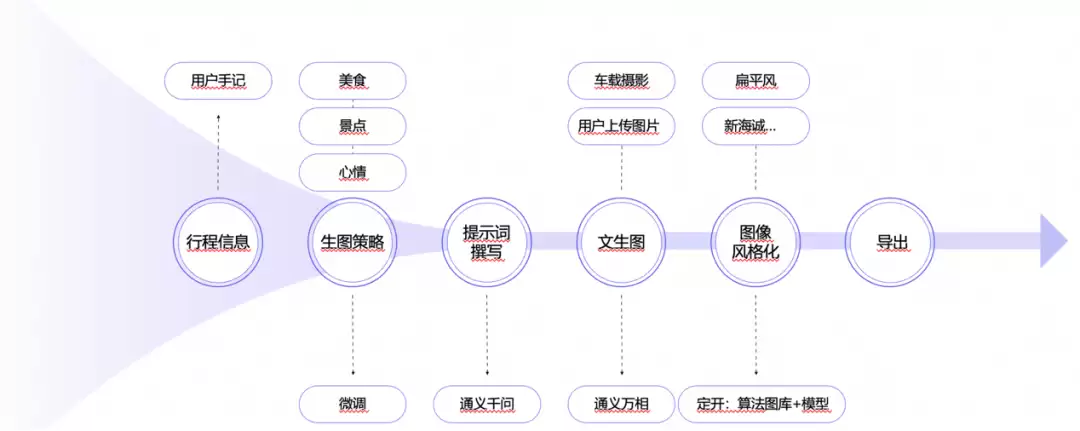
往往容易被忽视的第一步,就是基于具体的业务需求来设计完整的工作流。AIGC的最终效果要求极高,要实现既定目标,通常需要大语言模型、大视觉模型、NLP模型、VAE、CLIP等一系列模型的组合才能奏效。而且,ComfyUI的生图时间普遍较长,因此流程中节点的编排与选择、采用串行还是并行策略、以及具体在哪个环节添加图层,都非常有讲究。
3.3 自定义节点开发
完成工作流设计后,下一步就是基于开源社区,确认哪些节点可以直接使用,哪些则需要自己动手开发。目前GitHub上能获取到的标准ComfyUI节点基本都是开源模型节点,要实现上述链路所需的文生文和文生图功能,就需要对通义千问(qwen)和通义万相(wanx)节点进行定制化编写,之后才能挂载到ComfyUI上。下面是根据ComfyUI社区官方文档整理的《ComfyUI自定义节点开发规范》:
class Example:
    """
    A example node
    Class methods
    -------------
    INPUT_TYPES (dict):
        Tell the main program input parameters of nodes.
    IS_CHANGED:
        optional method to control when the node is re executed.
    Attributes
    ----------
    RETURN_TYPES (`tuple`):
        The type of each element in the output tuple.
    RETURN_NAMES (`tuple`):
        Optional: The name of each output in the output tuple.
    FUNCTION (`str`):
        The name of the entry-point method. For example, if `FUNCTION = "execute"` then it will run Example().execute()
    OUTPUT_NODE ([`bool`]):
        If this node is an output node that outputs a result/image from the graph. The Sa veImage node is an example.
        The backend iterates on these output nodes and tries to execute all their parents if their parent graph is properly connected.
        Assumed to be False if not present.
    CATEGORY (`str`):
        The category the node should appear in the UI.
    DEPRECATED (`bool`):
        Indicates whether the node is deprecated. Deprecated nodes are hidden by default in the UI, but remain
        functional in existing workflows that use them.
    EXPERIMENTAL (`bool`):
        Indicates whether the node is experimental. Experimental nodes are marked as such in the UI and may be subject to
        significant changes or removal in future versions. Use with caution in production workflows.
    execute(s) -> tuple || None:
        The entry point method. The name of this method must be the same as the value of property `FUNCTION`.
        For example, if `FUNCTION = "execute"` then this method's name must be `execute`, if `FUNCTION = "foo"` then it must be `foo`.
    """
    def __init__(self):
        pass
    @classmethod
    def INPUT_TYPES(s):
        """
            Return a dictionary which contains config for all input fields.
            Some types (string): "MODEL", "VAE", "CLIP", "CONDITIONING", "LATENT", "IMAGE", "INT", "STRING", "FLOAT".
            Input types "INT", "STRING" or "FLOAT" are special values for fields on the node.
            The type can be a list for selection.
            Returns: `dict`:
                - Key input_fields_group (`string`): Can be either required, hidden or optional. A node class must ha ve property `required`
                - Value input_fields (`dict`): Contains input fields config:
                    * Key field_name (`string`): Name of a entry-point method's argument
                    * Value field_config (`tuple`):
                        + First value is a string indicate the type of field or a list for selection.
                        + Second value is a config for type "INT", "STRING" or "FLOAT".
        """
        return {
            "required": {
                "image": ("IMAGE",),
                "int_field": ("INT", {
                    "default": 0,
                    "min": 0, #Minimum value
                     "max": 4096, #Maximum value
                    "step": 64, #Slider's step
                    "display": "number", # Cosmetic only: display as "number" or "slider"
                    "lazy": True # Will only be evaluated if check_lazy_status requires it
                }),
                "float_field": ("FLOAT", {
                    "default": 1.0,
                    "min": 0.0,
                    "max": 10.0,
                    "step": 0.01,
                    "round": 0.001, #The value representing the precision to round to, will be set to the step value by default. Can be set to False to disable rounding.
                    "display": "number",
                    "lazy": True
                }),
                "print_to_screen": (["enable", "disable"],),
                "string_field": ("STRING", {
                    "multiline": False, #True if you want the field to look like the one on the ClipTextEncode node
                    "default": "Hello World!",
                    "lazy": True
                }),
            },
        }
    RETURN_TYPES = ("IMAGE",)
    #RETURN_NAMES = ("image_output_name",)
    FUNCTION = "test"
    #OUTPUT_NODE = False
    CATEGORY = "Example"
    def check_lazy_status(self, image, string_field, int_field, float_field, print_to_screen):
        """
            Return a list of input names that need to be evaluated.
            This function will be called if there are any lazy inputs which ha ve not yet been
            evaluated. As long as you return at least one field which has not yet been evaluated
            (and more exist), this function will be called again once the value of the requested
            field is a vailable.
            Any evaluated inputs will be passed as arguments to this function. Any unevaluated
            inputs will ha ve the value None.
        """
        if print_to_screen == "enable":
            return ["int_field", "float_field", "string_field"]
        else:
            return []
    def test(self, image, string_field, int_field, float_field, print_to_screen):
        if print_to_screen == "enable":
            print(f"""Your input contains:
                string_field aka input text: {string_field}
                int_field: {int_field}
                float_field: {float_field}
            """)
        #do some processing on the image, in this example I just invert it
        image = 1.0 - image
        return (image,)
    """
        The node will always be re executed if any of the inputs change but
        this method can be used to force the node to execute again even when the inputs don't change.
        You can make this node return a number or a string. This value will be compared to the one returned the last time the node was
        executed, if it is different the node will be executed again.
        This method is used in the core repo for the LoadImage node where they return the image hash as a string, if the image hash
        changes between executions the LoadImage node is executed again.
    """
    #@classmethod
    #def IS_CHANGED(s, image, string_field, int_field, float_field, print_to_screen):
    #    return ""
# Set the web directory, any .js file in that directory will be loaded by the frontend as a frontend extension
# WEB_DIRECTORY = "./somejs"
# Add custom API routes, using router
from aiohttp import web
from server import PromptServer
@PromptServer.instance.routes.get("/hello")
async def get_hello(request):
    return web.json_response("hello")
# A dictionary that contains all nodes you want to export with their names
# NOTE: names should be globally unique
NODE_CLASS_MAPPINGS = {
    "Example": Example
}
# A dictionary that contains the friendly/humanly readable titles for the nodes
NODE_DISPLAY_NAME_MAPPINGS = {
    "Example": "Example Node"
}
依据此规范,通过调用百炼平台的接口,我们可以对qwen-max和wanx-v2模型进行节点封装,具体实现如下:
qwen-max的plugin 节点
from http import HTTPStatus
import dashscope
import json
class 旅行文本生成:

    def __init__(self):
        # temp
        dashscope.api_key = ""
    @classmethod
    def INPUT_TYPES(s):
        return {
            "required": {
                "system_prompt": ("STRING", {"default": """请根据我输入的中文描述,生成符合主题的完整提示词。生成后的内容服务于一个绘画AI,它只能理解具象的提示词而非抽象的概念。请严格遵守以下规则,规则如下:
#内容
根据文字生成一张与风景相关的优美的画面。
#风格
真实、高清、写实
#action
1.提取途径城市之一,根据此地点搜索当地最著名的景点或建筑,例如:上海,可提取上海东方明珠
2.提取有关天气的词汇,会决定于整个画面的色调
3.提取有关心情、驾驶体验的描述,与天气同时决定画面的色调
4.提取日期,判断季节,作为画面的主要色调参考
                """,
                "multiline": True
                }),
                "query_prompt": ("STRING", {
                    "default": """- 用户标记emoji:出游
- 用户文字:新司机的五一出游!
- 出行时间:2024/5/2 下午10:38-2024/5/5 下午6:57
- 总驾驶时长:14小时28分钟
- 公里数:645.4km
- 起点:上海市黄浦区中山南路1891号-1893号
- 起点天气:晴天
- 终点:上海市闵行区申长路688号
- 终点天气:多云
- 途径城市:湖州市 无锡市 常州市
- 组队信息:欧阳开心的队伍
- 车辆信息:黑色一代
                            """,
                    "multiline": True})
            },
        }
    RETURN_TYPES = ("STRING",)
    FUNCTION = "生成绘画提示词"
    CATEGORY = "旅行文本生成"
    def 生成绘画提示词(self, system_prompt, query_prompt):
        messages = [
            {'role': 'system', 'content': system_prompt},
            {'role': 'user', 'content': query_prompt}
        ]
        response = dashscope.Generation.call(
            model="qwen-max",
            messages=messages,
            result_format='message'
        )
        if response.status_code == HTTPStatus.OK:
            # Assuming the response contains the generated prompt in the 'output' field
            painting_prompt = response.output.choices[0].message.content
        else:
            raise Exception('Request failed: Request id: %s, Status code: %s, error code: %s, error message: %s' % (
                response.request_id, response.status_code,
                response.code, response.message
            ))
        return (painting_prompt,)
# A dictionary that contains all nodes you want to export with their names
NODE_CLASS_MAPPINGS = {
    "旅行文本生成": 旅行文本生成
}
# A dictionary that contains the friendly/humanly readable titles for the nodes
NODE_DISPLAY_NAME_MAPPINGS = {
    "旅行文本生成": "生成旅行本文提示词"
}
万相2.0的plugin 节点
from http import HTTPStatus
from urllib.parse import urlparse, unquote
from pathlib import PurePosixPath
import requests
import dashscope
from dashscope import ImageSynthesis
import random
class ImageSynthesisNode:
    """
    A node for generating images based on a provided prompt.
    Class methods
    -------------
    INPUT_TYPES (dict):
        Define the input parameters of the node.
    IS_CHANGED:
        Optional method to control when the node is re-executed.
    Attributes
    ----------
    RETURN_TYPES (`tuple`):
        The type of each element in the output tuple.
    FUNCTION (`str`):
        The name of the entry-point method.
    CATEGORY (`str`):
        The category the node should appear in the UI.
    """

    @classmethod
    def INPUT_TYPES(s):
        return {
            "required": {
                "prompt": ("STRING", {
                    "default": "",
                    "multiline": True
                    })
            },
        }
    RETURN_TYPES = ("STRING",)
    FUNCTION = "generate_image_url"
    CATEGORY = "Image Synthesis"
    def __init__(self):
        # 设置API密钥
        dashscope.api_key = ""
    def generate_image_url(self, prompt):
        negative_prompt_str = '(car:1.4), NSFW, nude, naked, porn, (worst quality, low quali-ty:1.4), deformed iris, deformed pupils, (deformed, distorted, disfigured:1.3), cropped, out of frame, poorly drawn, bad anatomy, wrong anatomy, extra limb, missing limb, floating limbs, cloned face, (mu-tated hands and fingers:1.4), disconnected limbs, extra legs, fused fingers, too many fingers, long neck, mutation, mutated, ugly, disgusting, amputa-tion, blurry, jpeg artifacts, watermark, water-marked, text, Signature, sketch'
        random_int = random.randint(1,4294967290)
        rsp = ImageSynthesis.call(
            model='wanx2-t2i-lite',
            prompt=prompt,
            negative_prompt=negative_prompt_str,
            n=1,
            size='768*960',
            extra_input={'seed':random_int}
        )
        if rsp.status_code == HTTPStatus.OK:
            # 获取生成的图片URL
            image_url = rsp.output.results[0].url
        else:
            raise Exception('Request failed: Status code: %s, code: %s, message: %s' % (
                rsp.status_code, rsp.code, rsp.message
            ))
        return (image_url,)
# A dictionary that contains all nodes you want to export with their names
NODE_CLASS_MAPPINGS = {
    "ImageSynthesisNode": ImageSynthesisNode
}
# A dictionary that contains the friendly/humanly readable titles for the nodes
NODE_DISPLAY_NAME_MAPPINGS = {
    "ImageSynthesisNode": "Image Synthesis Node"
}
# 示例调用
if __name__ == '__main__':
    # prompt = "A beautiful and realistic high-definition landscape scene, featuring the famous landmark of Wuxi, the Turtle Head Isle Park, as it is one of the cities passed through during the journey. The weather transitions from a clear, sunny day in the starting point, Shanghai, to a cloudy sky at the destination, also in Shanghai. This scenic drive, experienced by a new driver on a May Day trip, spans from the evening of May 2, 2024, to the late afternoon of May 5, 2024, covering a total distance of 645.4 kilometers. The mood is joyful and adventurous, with the team named "OuYang's Happy Team" enjoying the ride in a black ES. The overall tone of the image reflects the transition from a bright, cheerful start to a more serene, calm atmosphere, with lush greenery and blooming flowers indicating the early summer season. The harmonious blend of natural beauty and man-made structures, along with the changing weather, creates a picturesque and tranquil setting."
    prompt = "A beautiful and realistic high-definition landscape scene, featuring the famous landmark of Wuxi, the Turtle Head Isle Park, as it is one of the cities passed through during the journey. The weather transitions from a clear, sunny day in the starting point, Shanghai, to a cloudy sky at the destination, also in Shanghai. The overall tone of the image reflects the transition from a bright, cheerful start to a more serene, calm atmosphere, with lush greenery and blooming flowers indicating the early summer season. The harmonious blend of natural beauty and man-made structures, along with the changing weather, creates a picturesque and tranquil setting"
    node = ImageSynthesisNode()
    image_url = node.generate_image_url(prompt)
    print(f"Generated Image URL: {image_url}")
3.4 PAI 服务部署 & 算力选择
经过对比几家主流云厂商,阿里云的PAI平台和AWS的Bedrock服务对ComfyUI多版本的部署支持得比较好,对资源挂载的适配也做得不错。通过PAI部署ComfyUI,主要涉及两个版本:标准版适用于单用户使用WebUI或单实例调用API的场景,支持通过WebUI生成视频,也可以通过API调用,请求发送时绕过EAS接口,前端直接与后端交互,所有请求由同一实例处理。API版则会自动转换为异步模式,更适合高并发场景,仅支持API调用,在需要多实例部署时建议选用此版本。
从性价比角度出发,官方推荐的显卡类型包括GU30、A10或T4,系统默认选择GPU ml.gu7i.c16m60.1-gu30。实际测试下来,建议部署L20卡,其生图速度比GU30更快一些。综合性价比考量,最终选择的是单卡L20,搭配16核CPU和128G内存。
服务配置
{
    "cloud": {
        "computing": {
            "instance_type": "ecs.gn8is-2x.8xlarge"
        },
        "networking": {
            "security_group_id": "sg-uf626dg02ts498gqoa2n",
            "vpc_id": "vpc-uf6usys7jvf2p7ugcyq1j",
            "vswitch_id": "vsw-uf6lv36zo7kkzyq9blyc6"
        }
    },
    "containers": [
        {
            "image": "eas-registry-vpc.cn-shanghai.cr.aliyuncs.com/pai-eas/comfyui:1.7-beta",
            "port": 8000,
            "script": "python main.py --listen --port 8000 --data-dir /deta-code-oss"
        }
    ],
    "metadata": {
        "cpu": 32,
        "enable_webservice": true,
        "gpu": 2,
        "instance": 1,
        "memory": 256000,
        "name": "jiashu16"
    },
    "name": "jiashu16",
    "options": {
        "enable_cache": true
    },
    "storage": [
        {
            "mount_path": "/deta-code-oss",
            "oss": {
                "path": "oss://ai4d-k4kulrqkyt37jhz1mv/482832/data-205381316445420758/",
                "readOnly": false
            },
            "properties": {
                "resource_type": "model"
            }
        }
    ]
}
3.5 节点和模型挂载
服务部署完成后,系统会自动在已挂载的OSS或NAS存储空间中创建以下目录结构:
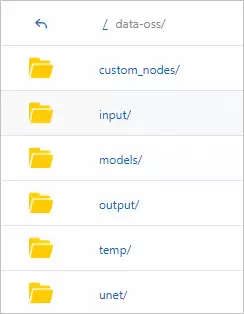
/custom_nodes目录用于存放ComfyUI插件,已经编写好的qwen-max和万相2.0的plugin节点需要上传到这里。/models目录用于存放模型文件。/output则是工作流最终输出结果的存储路径。
3.6 基于workflow json的服务接口建设
完成ComfyUI工作流的搭建后,主要步骤是开启开发者模式,导出workflow api json文件,后续就可以通过该文件进行API调用了。
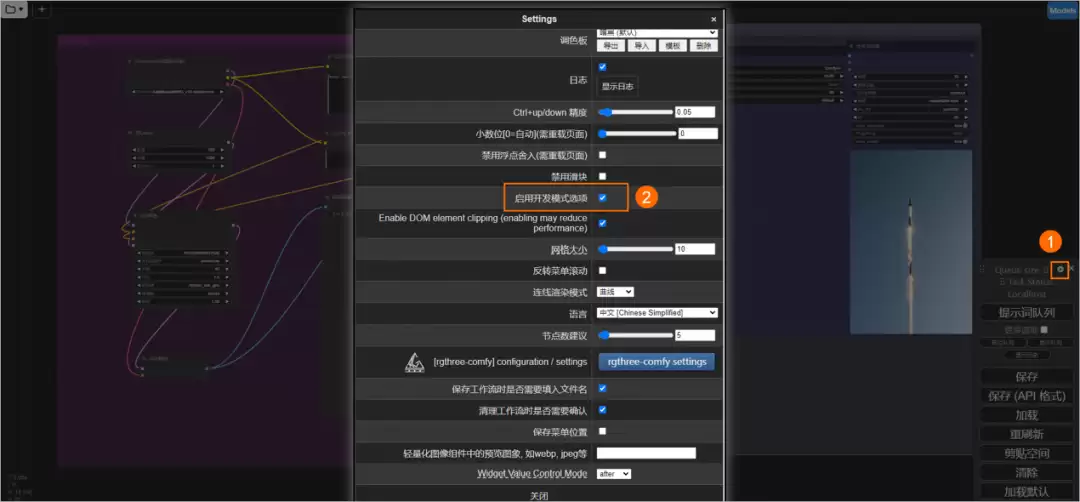
工作流workflow api json样例
工作流workflow api json样例{ "4": { "inputs": { "ckpt_name": "基础模型XL _xl_1.0.safetensors" }, "class_type": "CheckpointLoaderSimple", "_meta": { "title": "Checkpoint加载器(简易)" } }, "6": { "inputs": { "text": [ "149", 0 ], "speak_and_recognation": true, "clip": [ "145", 1 ] }, "class_type": "CLIPTextEncode", "_meta": { "title": "CLIP文本编码器" } }, "7": { "inputs": { "text": "*I* *Do* *Not* *Use* *Negative* *Prompts*", "speak_and_recognation": true, "clip": [ "145", 1 ] }, "class_type": "CLIPTextEncode", "_meta": { "title": "CLIP文本编码器" } }3.7 工程架构和稳定性保障
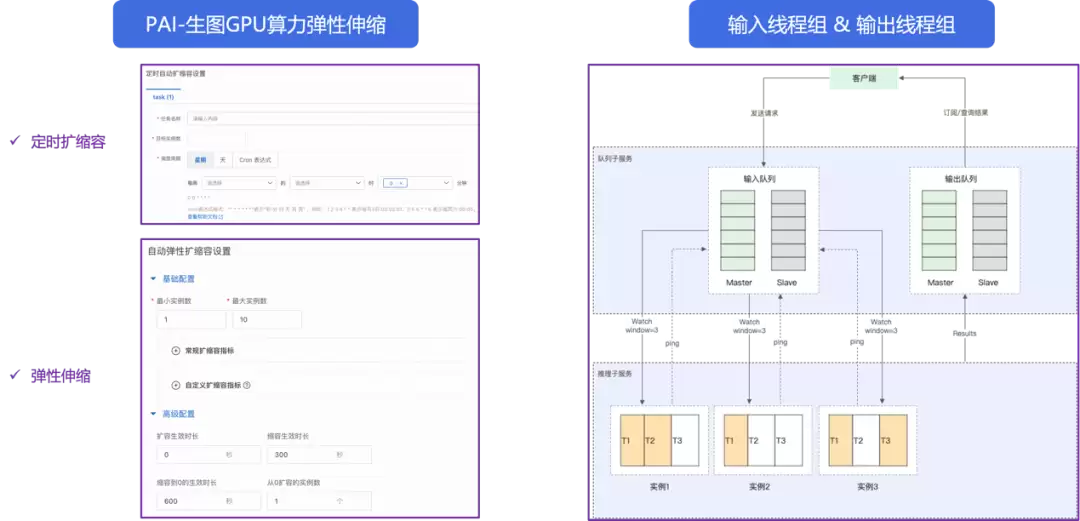
这里重点展示基于PAI ComfyUI搭配百炼平台qwen和万相模型的架构设计及其稳定性保障措施。上层应用部署在ACS或者ECS,可以根据客户的真实环境和现有资源情况进行灵活调整。
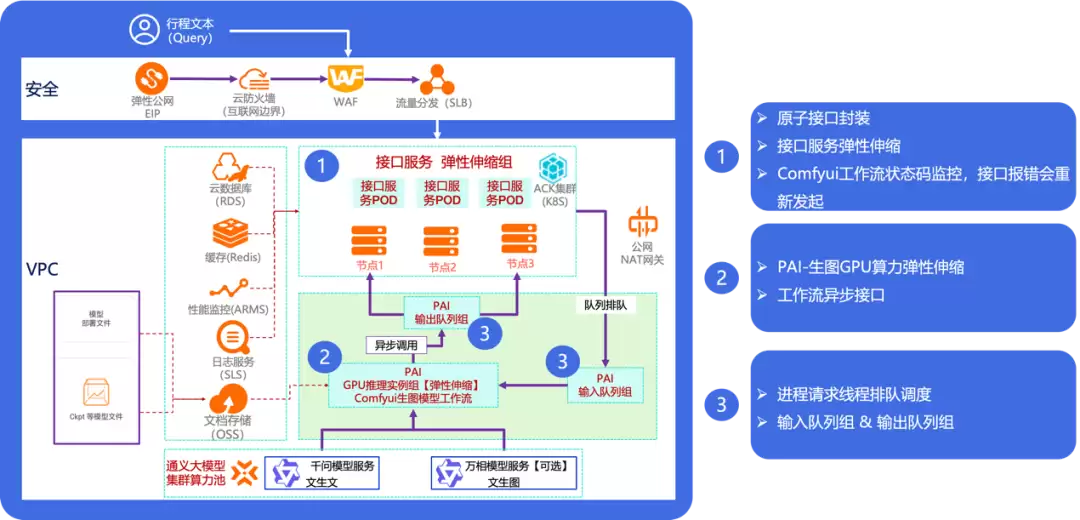
同时,所有生成的图像需要紧贴用户最新的旅程时间,因此图片具有很强的季节性特征(如旅游旺季和淡季)。所以,整个系统架构从模型层到应用层,都需要具备高QPS处理和弹性伸缩的能力,以应对流量波动。
四、技术服务避坑点
避坑点1: 测试和生产环境下,ComfyUI的版本切换
针对生产环境和测试环境,部署的版本选择需要特别留意,不同版本的API调用效果差异明显。标准版服务仅支持同步调用方式,即客户端发送请求后同步等待结果返回。API版服务则仅支持异步调用,客户端通过EAS的队列服务向输入队列发送请求,并通过订阅的方式从输出队列获取结果。从POC(概念验证)阶段向商业化调用切换时,往往涉及ComfyUI服务的切换,对应的OSS挂载必须对不同环境进行隔离,否则oss/temp文件夹会将不同服务的中间节点产物混存,造成相互干扰。
避坑点2: 提前规划工作流涉及的资源互访和授权
通常一个完整的工作流会涉及千问、万相、可图、FLUX等一系列模型,每个模型生成的文本和图片都会在上下游节点中作为输入和输出参数。因此,在流程的每一步中,对应的EIP、NAT网关、OSS挂载授权等最好提前做好规划。尤其需要注意的是,千问和万相的输出内容默认会保存在某个固定的region中,务必提前考虑跨region访问的问题。