
引言
在现代Web应用开发实践中,Spring Security凭借其强大的身份验证与授权能力,已成为Java生态中最主流的安全框架之一。然而,实际项目中常会遇到一个看似简单却容易踩坑的问题:如何让静态资源(如CSS样式表、JavaScript脚本、图片、字体文件等)绕过安全认证,实现免登录公开访问?
若未妥善处理此问题,用户访问页面时可能遭遇布局错乱、样式缺失、脚本无法加载等情况,严重损害用户体验。更糟的是,关键前端资源(例如登录页的JS文件)一旦被拦截,甚至会导致整个登录流程中断,无法正常进行。
本文将深入探讨Spring Security中静态资源免认证访问的配置方案,从基础原理到高级技巧,从常见误区到最佳实践,力求帮助读者全面掌握这一核心知识点。无论你是刚入门的新手,还是已有一定经验的开发者,都能从中获得切实可行的解决方案与深度见解。
为什么需要静态资源免认证?
在解答“怎么做”之前,我们先理解“为什么”要有这样的配置。
默认情况下,Spring Security会拦截所有请求路径进行安全校验。这意味着,即便是简单的 /css/style.css 请求,也会被要求身份验证。对于登录页面、错误页面、公共资源等场景,这显然是不合理的。
典型问题场景
- 登录页面样式丢失:用户访问
/login时,浏览器加载/css/login.css的请求被Spring Security拦截并重定向至登录页,导致无限循环或样式失效。 - 公共API文档无法访问:Swagger UI或OpenAPI文档包含大量静态资源(JS、CSS、YAML),若未放行,文档页面将无法正常渲染。
- 前端构建产物被拦截:使用Vue、React等现代前端框架构建的单页应用(SPA),其
dist目录下的所有资源都需要公开访问。 - 验证码图片无法显示:尽管验证码接口本身可能需要认证逻辑,但生成的图片资源路径必须可公开访问。
顺便一提,Spring Boot默认会将 /static、/public、/resources、/META-INF/resources 下的静态资源映射到根路径(/**)。例如,src/main/resources/static/css/app.css 可通过 https://localhost:8080/css/app.css 访问。
Spring Security的请求处理流程
要正确配置静态资源放行,首先需要理解Spring Security如何处理一个HTTP请求。
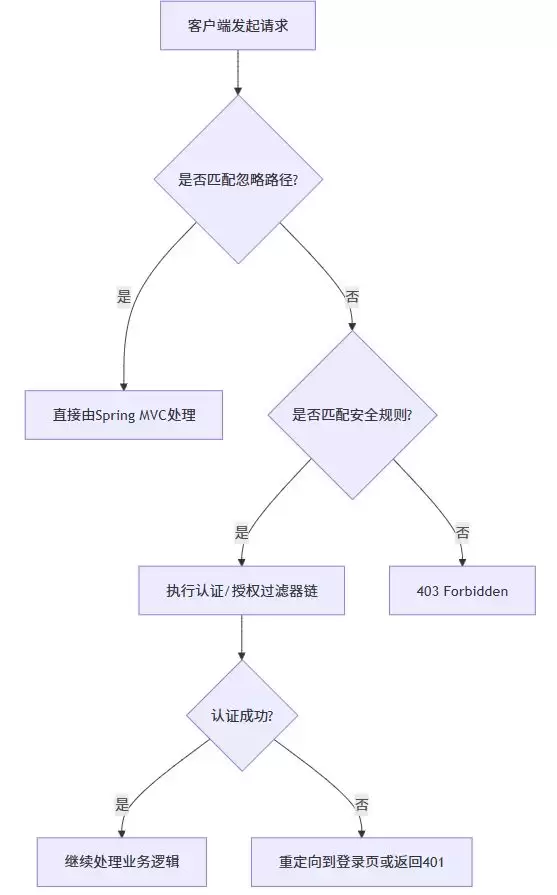
从上图可见,Spring Security提供了两种主要方式来“绕过”安全检查:
WebSecurity.ignore():完全忽略某些路径,此类请求不会进入Spring Security的过滤器链。HttpSecurity.authorizeHttpRequests().permitAll():请求仍会经过Security过滤器,但被明确授权为“无需认证即可访问”。
这两种方式在性能与安全性上有细微差异,后文将详细讨论。
方法一:使用WebSecurity的ignoring()方法
这是最彻底、性能最优的方式。被忽略的路径完全不会经过Spring Security的任何过滤器,包括CSRF、Session管理等。
基本配置示例
@Configuration
@EnableWebSecurity
public class SecurityConfig {

    @Bean
    public SecurityFilterChain filterChain(HttpSecurity http) throws Exception {
        http
            .authorizeHttpRequests(authz -> authz
                .requestMatchers("/admin/**").hasRole("ADMIN")
                .anyRequest().authenticated()
            )
            .formLogin(form -> form
                .loginPage("/login")
                .permitAll()
            );
        return http.build();
    }

    @Bean
    public WebSecurityCustomizer webSecurityCustomizer() {
        return (web) -> web.ignoring()
            .requestMatchers("/css/**", "/js/**", "/images/**", "/webjars/**");
    }
}
在此配置中:
- 所有以
/css/、/js/、/images/开头的请求,以及WebJars资源,都会被WebSecurity忽略。 - 这些请求直接由Spring MVC的
ResourceHttpRequestHandler处理,性能更佳。 - 注意:
/login页面本身虽然需要放行,但它是控制器路径,而非静态资源,因此应在HttpSecurity中配置permitAll(),而非在ignoring()中。
使用Ant风格路径匹配
Spring Security支持Ant风格的路径模式,灵活性很高:
/**:匹配任意层级的路径/*.css:匹配根路径下的所有CSS文件/static/**:匹配/static/下的所有内容/api/v1/public/**:匹配特定API路径
@Bean
public WebSecurityCustomizer webSecurityCustomizer() {
    return (web) -> web.ignoring()
        .requestMatchers(
            PathRequest.toStaticResources().atCommonLocations(), // 内置静态资源位置
            "/fa vicon.ico",
            "/robots.txt",
            "/manifest.json"
        );
}
PathRequest.toStaticResources().atCommonLocations() 是Spring Boot提供的便捷方法,它会自动包含常见静态资源路径,如 /webjars/**、/css/**、/js/** 等,推荐直接使用。
何时使用ignoring()?
- 纯静态资源:CSS、JS、图片、字体等。
- 性能敏感场景:高并发的公共资源访问。
- 不需要任何安全上下文:这些资源不依赖用户身份或会话信息。
方法二:使用HttpSecurity的permitAll()
与 ignoring() 不同,permitAll() 会让请求仍然经过Spring Security的完整过滤器链,仅在授权阶段被放行。
基本配置示例
@Configuration
@EnableWebSecurity
public class SecurityConfig {

    @Bean
    public SecurityFilterChain filterChain(HttpSecurity http) throws Exception {
        http
            .authorizeHttpRequests(authz -> authz
                .requestMatchers("/css/**", "/js/**", "/images/**").permitAll()
                .requestMatchers("/login", "/register", "/error").permitAll()
                .requestMatchers("/admin/**").hasRole("ADMIN")
                .anyRequest().authenticated()
            )
            .formLogin(form -> form
                .loginPage("/login")
                .permitAll()
            );
        return http.build();
    }
}
注意这里我们将静态资源路径放在了 authorizeHttpRequests() 中,并调用 permitAll()。
permitAll()的特点
- 仍经过安全过滤器:包括CSRF保护、Session创建、SecurityContext设置等。
- 可以访问Security Context:在Controller或Thymeleaf模板中,仍然可以获取当前认证信息(尽管可能是匿名的)。
- 适用于需要部分安全功能的场景:例如,某些静态资源可能需要记录访问日志(通过自定义过滤器),或需要CSRF Token(虽然罕见)。
实际应用场景
假设你有一个前端应用,其入口HTML文件(如 index.html)需要根据用户是否登录显示不同内容。此时尽管 index.html 是静态资源,但你希望它能感知安全上下文:
My App
Hello,
!
退出
在这种情况下,index.html 不能被 ignoring(),否则Thymeleaf的安全方言(sec:authorize)将无法工作。你需要将其放在 permitAll() 中:
.requestMatchers("/", "/index.html", "/css/**", "/js/**").permitAll()
ignoring() vs permitAll():关键区别
| 特性 | WebSecurity.ignoring() | HttpSecurity.permitAll() |
|---|---|---|
| 是否经过 Security 过滤器链 | ❌ 完全跳过 | ✅ 完整经过 |
| 性能 | ⚡ 更高(无安全开销) | 略低(有安全开销) |
| 能否访问 SecurityContext | ❌ 不能 | ✅ 能(可能是匿名认证) |
| CSRF 保护 | ❌ 无 | ✅ 有(但通常不需要) |
| Session 创建 | ❌ 不创建 | ✅ 可能创建(取决于配置) |
| 适用资源类型 | 纯静态资源(CSS/JS/图片) | 需要安全上下文的页面 |
最佳实践建议:
- 对于 纯静态资源(CSS、JS、图片、字体等),优先使用
ignoring()。 - 对于 HTML页面(尤其是需要动态内容的),使用
permitAll()。 - 登录页、注册页、错误页等控制器路径,必须使用
permitAll()。
常见误区与陷阱
误区1:混淆静态资源路径与控制器路径
不少开发者会错误地将控制器路径(如 /login)添加到 ignoring() 中:
// ❌ 错误做法
@Bean
public WebSecurityCustomizer webSecurityCustomizer() {
    return (web) -> web.ignoring()
        .requestMatchers("/login", "/css/**"); // /login 是控制器,不是静态资源!
}
这样做的后果:/login 请求完全绕过了Spring Security,导致:
- 无法使用Thymeleaf安全标签(如
sec:authorize) - 无法自动处理登录失败重定向
- 可能引发CSRF漏洞(若表单提交未保护)
✅ 正确做法:控制器路径应在 HttpSecurity 中配置 permitAll()。
误区2:路径匹配顺序错误
Spring Security的匹配规则是按顺序匹配,一旦匹配成功即停止。因此,更具体的规则应放在前面:
// ✅ 正确顺序
.requestMatchers("/admin/**").hasRole("ADMIN")
.requestMatchers("/user/**").hasRole("USER")
.requestMatchers("/css/**", "/js/**").permitAll()
.anyRequest().authenticated()

// ❌ 错误顺序:/admin/** 永远不会被匹配到
.requestMatchers("/css/**", "/js/**").permitAll()
.requestMatchers("/admin/**").hasRole("ADMIN") // 这行永远不会执行!
.anyRequest().authenticated()
误区3:忽略WebJars资源
若你使用了WebJars(将前端库打包为JAR依赖),需特别放行 /webjars/** 路径:
@Bean
public WebSecurityCustomizer webSecurityCustomizer() {
    return (web) -> web.ignoring()
        .requestMatchers("/webjars/**"); // 放行WebJars
}
否则,像Bootstrap、jQuery等库将无法加载。
误区4:生产环境与开发环境配置混用
在开发环境中,可能使用内嵌的H2控制台或Actuator端点,需额外放行:
// 仅在开发环境启用
@Profile("dev")
@Bean
public WebSecurityCustomizer devWebSecurityCustomizer() {
    return (web) -> web.ignoring()
        .requestMatchers("/h2-console/**", "/actuator/**");
}
但在生产环境中,这些路径应严格保护或禁用,避免安全风险。
高级配置技巧
动态配置静态资源路径
有时静态资源路径来自配置文件(如 application.yml),可通过 @Value 注入:
# application.yml
app:
  static-paths:
    - /custom-assets/**
    - /uploads/**
@Configuration
@EnableWebSecurity
public class SecurityConfig {

    @Value("${app.static-paths}")
    private String[] staticPaths;

    @Bean
    public WebSecurityCustomizer webSecurityCustomizer() {
        return (web) -> web.ignoring()
            .requestMatchers(staticPaths);
    }
}
结合ResourceHandlerRegistry
若你自定义了静态资源位置(通过 WebMvcConfigurer),确保Security配置与之匹配:
@Configuration
public class WebConfig implements WebMvcConfigurer {

    @Override
    public void addResourceHandlers(ResourceHandlerRegistry registry) {
        registry.addResourceHandler("/uploads/**")
                .addResourceLocations("file:/opt/myapp/uploads/");
    }
}

// SecurityConfig.ja va
@Bean
public WebSecurityCustomizer webSecurityCustomizer() {
    return (web) -> web.ignoring()
        .requestMatchers("/uploads/**"); // 与 ResourceHandler 一致
}
处理SPA(单页应用)路由
对于Vue、React等SPA应用,所有前端路由都应返回 index.html。你需要放行所有非API路径:
@Bean
public SecurityFilterChain filterChain(HttpSecurity http) throws Exception {
    http
        .authorizeHttpRequests(authz -> authz
            .requestMatchers("/api/**").authenticated() // API 需要认证
            .requestMatchers("/**").permitAll() // 所有其他路径(包括前端路由)公开
        )
        .csrf(csrf -> csrf
            .ignoringRequestMatchers("/api/**") // 根据需要调整 CSRF
        );
    return http.build();
}

// 同时配置 WebMvcConfigurer 处理前端路由
@Configuration
public class SpaWebConfig implements WebMvcConfigurer {
    @Override
    public void addViewControllers(ViewControllerRegistry registry) {
        registry.addViewController("/{spring:\w+}")
                .setViewName("forward:/index.html");
        registry.addViewController("/**/{spring:\w+}")
                .setViewName("forward:/index.html");
    }
}
完整示例:企业级应用配置
下面是一个融合多种场景的完整配置示例:
@Configuration
@EnableWebSecurity
public class EnterpriseSecurityConfig {

    @Bean
    public SecurityFilterChain filterChain(HttpSecurity http) throws Exception {
        http
            .authorizeHttpRequests(authz -> authz
                // 公共页面
                .requestMatchers("/", "/login", "/register", "/forgot-password", "/error").permitAll()
                // Swagger UI (开发环境)
                .requestMatchers("/swagger-ui/**", "/v3/api-docs/**").permitAll()
                // 公共 API
                .requestMatchers("/api/public/**").permitAll()
                // 用户相关 API
                .requestMatchers("/api/user/**").hasRole("USER")
                // 管理员 API
                .requestMatchers("/api/admin/**").hasRole("ADMIN")
                // 其他 API 需要认证
                .requestMatchers("/api/**").authenticated()
                // 前端路由(SPA)
                .requestMatchers("/**").permitAll()
            )
            .formLogin(form -> form
                .loginPage("/login")
                .loginProcessingUrl("/login")
                .defaultSuccessUrl("/dashboard", true)
                .failureUrl("/login?error=true")
                .permitAll()
            )
            .logout(logout -> logout
                .logoutUrl("/logout")
                .logoutSuccessUrl("/?logout=true")
                .permitAll()
            )
            .csrf(csrf -> csrf
                .ignoringRequestMatchers("/api/**") // 假设 API 使用 JWT,无需 CSRF
            );

        return http.build();
    }

    @Bean
    public WebSecurityCustomizer webSecurityCustomizer() {
        return (web) -> web.ignoring()
            // 内置静态资源位置
            .requestMatchers(PathRequest.toStaticResources().atCommonLocations())
            // 自定义静态资源
            .requestMatchers("/uploads/**", "/downloads/**")
            // 开发工具(仅 dev profile)
            .requestMatchers("/h2-console/**");
    }
}
该配置覆盖了:
- 公共页面与静态资源
- Swagger文档(常用于API调试)
- 分层的API权限控制
- SPA前端路由支持
- 完整的登录/登出流程
- CSRF保护的合理豁免
测试你的配置
配置完成后,务必进行充分测试:
- 直接访问静态资源URL:如
https://localhost:8080/css/app.css,应能直接下载文件,无重定向。 - 访问登录页:确保样式和脚本正常加载。
- 未登录访问受保护页面:应被重定向到登录页。
- 登录后访问资源:确保权限控制生效。
可以使用Spring Security的测试支持编写单元测试:
@SpringBootTest
@AutoConfigureTestDatabase
@Import(SecurityConfig.class)
class SecurityConfigTest {

    @Autowired
    private MockMvc mockMvc;

    @Test
    void staticResourcesShouldBePublic() throws Exception {
        mockMvc.perform(get("/css/app.css"))
               .andExpect(status().isOk())
               .andExpect(content().contentType("text/css"));
    }

    @Test
    void loginPageShouldBePublic() throws Exception {
        mockMvc.perform(get("/login"))
               .andExpect(status().isOk())
               .andExpect(view().name("login"));
    }

    @Test
    void adminPageShouldRequireAuth() throws Exception {
        mockMvc.perform(get("/admin/dashboard"))
               .andExpect(status().is3xxRedirection())
               .andExpect(redirectedUrl("https://localhost/login"));
    }
}
性能考量与优化
虽然静态资源放行对性能影响不大,但在高并发场景下,仍有一些优化点:
1. 优先使用ignoring()
如前所述,ignoring() 完全跳过Security过滤器链,减少了不必要的对象创建和方法调用。
2. 合理使用缓存头
为静态资源添加缓存头,减少重复请求:
@Configuration
public class WebConfig implements WebMvcConfigurer {
    @Override
    public void addResourceHandlers(ResourceHandlerRegistry registry) {
        registry.addResourceHandler("/static/**")
                .addResourceLocations("classpath:/static/")
                .setCachePeriod(3600) // 1小时缓存
                .resourceChain(true)
                .addResolver(new VersionResourceResolver().addContentVersionStrategy("/**"));
    }
}
3. 使用CDN
对于大型应用,考虑将静态资源托管到CDN,进一步减轻服务器压力。
安全注意事项
放行静态资源虽必要,但也需注意安全:
1. 避免路径遍历漏洞
不要放行过于宽泛的路径,如 /**,除非你明确知道自己在做什么(如SPA场景)。
// ❌ 危险!可能暴露敏感文件
.requestMatchers("/**").permitAll()
2. 敏感信息不要放在静态资源中
即使放行了 /config/,也不要在此目录下存放包含密码、密钥的JSON文件。
3. 定期审计放行路径
随着项目演进,及时清理不再需要的放行规则。
与其他技术的集成
与Thymeleaf集成
Thymeleaf的Spring Security方言(thymeleaf-extras-springsecurity)需要Security Context,因此使用 permitAll() 而非 ignoring():
    org.thymeleaf.extras
    thymeleaf-extras-springsecurity6
Welcome,
!
与Spring Boot Actuator集成
Actuator端点通常需要保护,但健康检查(/actuator/health)可能需要公开:
.requestMatchers("/actuator/health", "/actuator/info").permitAll()
.requestMatchers("/actuator/**").hasRole("ADMIN")
与OAuth2集成
在OAuth2应用中,静态资源放行逻辑相同,但需注意回调路径(如 /login/oauth2/code/*)必须放行:
.requestMatchers("/login/oauth2/code/**").permitAll()
.requestMatchers("/css/**", "/js/**").permitAll()
总结与最佳实践
通过本文的深入剖析,我们明确了Spring Security中静态资源免认证访问的核心要点:
区分两种放行方式:
WebSecurity.ignoring():用于纯静态资源,性能最优。HttpSecurity.permitAll():用于需要安全上下文的页面。
遵循最小权限原则:只放行必要的路径,避免过度开放。
注意路径匹配顺序:具体规则在前,通用规则在后。
测试覆盖全面:确保静态资源、公共页面、受保护资源均按预期工作。
结合项目实际:SPA、传统多页应用、混合架构各有不同的配置策略。
最后,记住:安全与便利需要平衡。合理的静态资源放行配置,既能保障系统安全,又能提供流畅的用户体验。希望本文能帮助你在Spring Security的道路上走得更稳、更远!


