
导航
主从集群、哨兵集群、分区集群
环境:
Redis 版本:5.0.8,Spring Boot 版本:2.2.3.RELEASE。Redis 安装指南可参考《CentOS7 下安装 Redis(单机版)》,主从部署详情见《Redis 集群部署及 Spring Boot 架构下应用(主从集群模式)》。
谈到 Redis 的高可用方案,哨兵模式无疑是一个核心话题。今天我们将从部署到 Spring Boot 集成,彻底掌握哨兵集群的实现细节。
集群方式及配置
基础集群配置如下:
后台运行(守护进程)daemonize yes 去除保护模式(允许远程访问)protected-mode no#去除绑定(远程访问)#bind 127.0.0.1# 设置密码requirepass redispwd本次配置基于同一机器的不同端口构建集群。若 Redis 位于不同机器,部分配置可省略(以下配置过程中会标明【单机非必须】:当前机器仅运行一个 Redis 实例)。
Sentinel 哨兵集群
哨兵模式本质上是一种“监控 + 选举”机制,用于解决主从复制集群中节点宕机后无法自动故障转移的问题。简单来说,它相当于为主从架构配备了一个自动运维团队。
主从配置(略) 参见《Redis 集群部署及 Spring Boot 架构下应用(主从集群模式)》。 哨兵 16379 配置 复制一份配置文件,命名为 sentinel16379.conf(来源为安装目录:redis-5.0.8/sentinel.conf),修改以下配置:
#哨兵服务端口,注意不能跟redis服务端口冲突,且每个哨兵端口不一样port 16379#后台运行(守护进程)daemonize yes#pid写入路径pidfile /var/run/redis-sentinel16379.pid#log目录logfile "./sentinel/16379.log"#工作目录dir ./sentinel/16379#关闭保护模式(取消该行前注释即可)protected-mode no#设置监控主节点信息(参考如下配置)sentinel monitor mymaster 192.168.1.17 6379 2#设置redis密码sentinel auth-pass mymaster redispwd哨兵 16380 配置 复制 sentinel16379.conf 重命名为 sentinel16380.conf,修改以下配置:
#哨兵服务端口,注意不能跟redis服务端口冲突,且每个哨兵端口不一样port 16380#pid写入路径pidfile /var/run/redis-sentinel16380.pid#log目录logfile "./sentinel/16380.log"#工作目录dir ./sentinel/16380哨兵 16381 配置 复制 sentinel16379.conf 重命名为 sentinel16381.conf,修改以下配置:
#哨兵服务端口,注意不能跟redis服务端口冲突,且每个哨兵端口不一样port 16381#pid写入路径pidfile /var/run/redis-sentinel16381.pid#log目录logfile "./sentinel/16381.log"#工作目录dir ./sentinel/16381哨兵 16382 配置 复制 sentinel16379.conf 重命名为 sentinel16382.conf,修改以下配置:
#哨兵服务端口,注意不能跟redis服务端口冲突,且每个哨兵端口不一样port 16382#pid写入路径pidfile /var/run/redis-sentinel16382.pid#log目录logfile "./sentinel/16382.log"#工作目录dir ./sentinel/16382注意:
这里有一个关键点:sentinel monitor mymaster 192.168.1.17 6379 2 中的“2”代表最低通过票数。也就是说,当至少 2 个哨兵认为主节点不可用时,才会触发故障转移。因此,哨兵总数不能小于该值,通常建议部署奇数个哨兵。
以下是几个与故障判定和切换相关的参数:
#判定master节点失活时间(单位毫秒)sentinel down-after-milliseconds mymaster 30000#主备切换时,slave最大同时同步个数(1:即主备切换每次一个slave节点向master同步)sentinel parallel-syncs mymaster 1#sentinel故障转移超时时间(单位毫秒)sentinel failover-timeout mymaster 180000其中,192.168.1.17 为主节点地址,6379 为主节点端口,2 为最低通过票数。
启动哨兵
./bin/redis-sentinel sentinel16379.conf ./bin/redis-sentinel sentinel16380.conf ./bin/redis-sentinel sentinel16381.conf ./bin/redis-sentinel sentinel16382.conf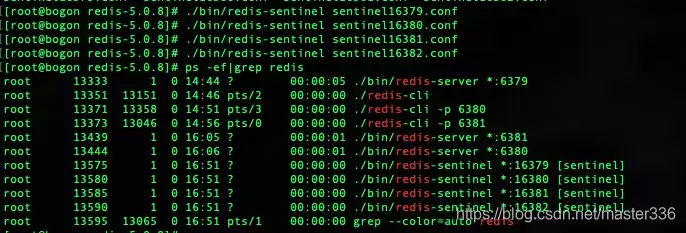 在这里插入图片描述
查看状态(info):
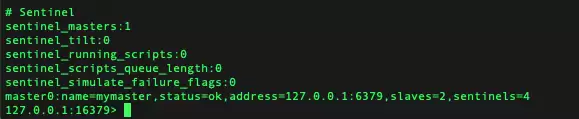 在这里插入图片描述
可以看到主节点状态、IP 端口、从节点数量、哨兵数量(4个),一切正常。接下来模拟主节点宕机场景。
kill 主节点,查看主备切换
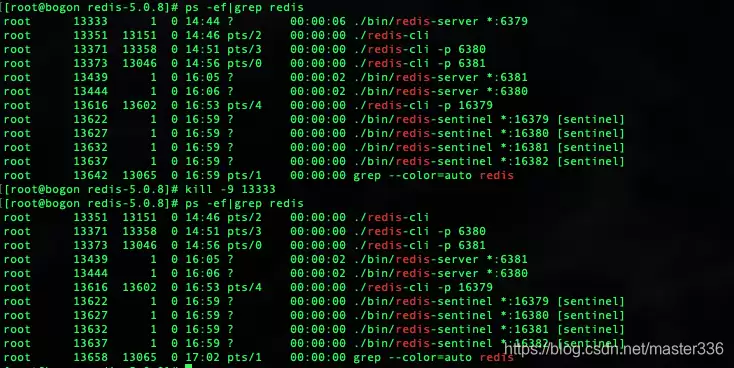 在这里插入图片描述
再次查看状态:
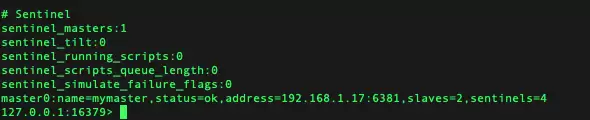 在这里插入图片描述
主节点已切换至 6381,哨兵自动完成选举。查看新的主节点信息:
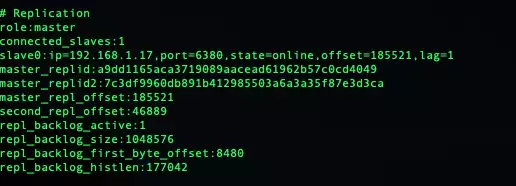 在这里插入图片描述
验证读写:
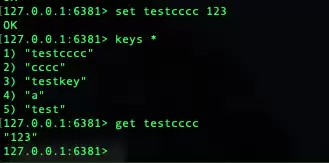 在这里插入图片描述
从节点读写:
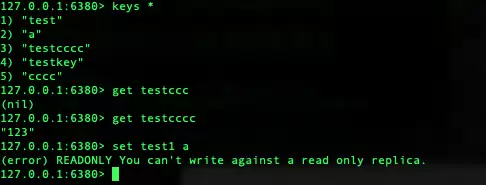 在这里插入图片描述
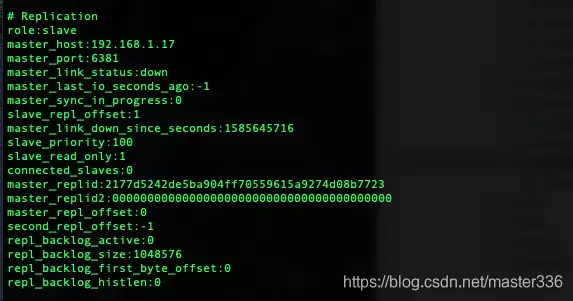
重启被 kill 的主节点,查看其状态
 在这里插入图片描述
 在这里插入图片描述
有趣的现象发生了:重启后的节点虽然识别了主节点信息,但并未自动加入从节点列表。查看主节点信息,它仍然显示为一个从节点。这意味着新启动的节点无法正常加入集群工作。问题出在哪里?
分析一下:该节点因手动 kill 而宕机,网络显然正常。那么,它和一个全新的从节点相比,缺少了什么?回顾主从配置:
#主节点地址(ip 端口)slaveof 192.168.1.17 6379#master节点密码,(打开注释,修改master的密码即可)masterauth redispwd从 info 信息看,主节点 IP 和端口正确,问题大概率出在密码上。最初的 master 节点配置中,并未配置 masterauth。加上 masterauth 后重启,再看结果:
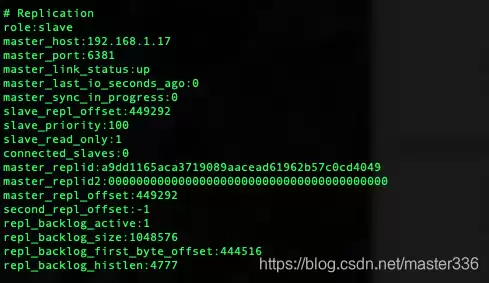 在这里插入图片描述
查看主节点状态:
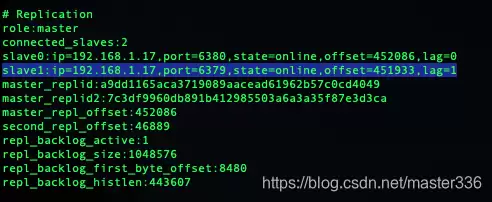 在这里插入图片描述
问题解决。这个小插曲提醒我们:密码相关的配置必须前后一致,缺一不可。
Sentinel 哨兵集群在 Spring Boot 中的配置
1. pom 引入
org.springframework.boot spring-boot-starter-data-redis 2. yml 配置(properties 配置文件类型请自行转换)
spring:redis: # 集群(哨兵)模式sentinel:nodes:- 192.168.1.17:16379- 192.168.1.17:16380- 192.168.1.17:16381- 192.168.1.17:16382master: mymaster3. 封装 RedisTemplate(MyRedisConfig.java)
import com.fasterxml.jackson.annotation.JsonAutoDetect;import com.fasterxml.jackson.annotation.PropertyAccessor;import com.fasterxml.jackson.databind.ObjectMapper;import org.springframework.boot.autoconfigure.data.redis.RedisProperties;import org.springframework.cache.annotation.EnableCaching;import org.springframework.context.annotation.Bean;import org.springframework.context.annotation.Configuration;import org.springframework.data.redis.connection.RedisConnectionFactory;import org.springframework.data.redis.connection.RedisNode;import org.springframework.data.redis.connection.RedisSentinelConfiguration;import org.springframework.data.redis.core.RedisTemplate;import org.springframework.data.redis.core.StringRedisTemplate;import org.springframework.data.redis.core.ValueOperations;import org.springframework.data.redis.serializer.Jackson2JsonRedisSerializer;import org.springframework.data.redis.serializer.StringRedisSerializer;@Configuration@EnableCachingpublic class MyRedisConfig {@Beanpublic RedisSentinelConfiguration redisSentinelConfiguration(RedisProperties redisProperties){ RedisSentinelConfiguration configuration = new RedisSentinelConfiguration(redisProperties.getSentinel().getMaster(),new HashSet<>(redisProperties.getSentinel().getNodes()));// 实际使用过程中发现,yml中的密码并不会赋值到 检查RedisSentinelConfiguration发现nodepasswd仅有get和set方法,需要手动加入configuration.setPassword(redisProperties.getPassword().toCharArray());return configuration;}@Beanpublic RedisTemplate redisTemplate(RedisConnectionFactory redisConnectionFactory) {RedisTemplate redisTemplate = new RedisTemplate<>();redisTemplate.setConnectionFactory(redisConnectionFactory);// 使用Jackson2JsonRedisSerialize 替换默认的jdkSerializeable序列化Jackson2JsonRedisSerializer jackson2JsonRedisSerializer = new Jackson2JsonRedisSerializer(Object.class);ObjectMapper objectMapper = new ObjectMapper();objectMapper.setVisibility(PropertyAccessor.ALL, JsonAutoDetect.Visibility.ANY);objectMapper.enableDefaultTyping(ObjectMapper.DefaultTyping.NON_FINAL);jackson2JsonRedisSerializer.setObjectMapper(objectMapper);// 设置value的序列化规则和 key的序列化规则redisTemplate.setKeySerializer(new StringRedisSerializer());redisTemplate.setValueSerializer(jackson2JsonRedisSerializer);redisTemplate.afterPropertiesSet();return redisTemplate;}/** * 对redis字符串类型数据操作 * * @param stringRedisTemplate * @return */@Bean({"valueoperations"})public ValueOperations valueOperations(StringRedisTemplate stringRedisTemplate) {return stringRedisTemplate.opsForValue();}} 4. 测试 Controller(SysController.java)
import com.platform.test.common.exception.BusinessException;import com.platform.test.service.SysService;import com.platform.test.vo.BaseRespVo;import org.slf4j.Logger;import org.slf4j.LoggerFactory;import org.springframework.beans.factory.annotation.Autowired;import org.springframework.beans.factory.annotation.Qualifier;import org.springframework.data.redis.core.RedisTemplate;import org.springframework.data.redis.core.ValueOperations;import org.springframework.web.bind.annotation.RequestMapping;import org.springframework.web.bind.annotation.RestController;import javax.servlet.http.HttpSession;import java.text.SimpleDateFormat;import java.util.Date;import java.util.HashMap;import java.util.concurrent.TimeUnit;@RestController@RequestMapping("/sys")public class SysController {static final Logger logger = LoggerFactory.getLogger(SysController.class);@Autowired@Qualifier("valueoperations")ValueOperations valueOperations;@AutowiredRedisTemplate redisTemplate;@AutowiredSysService sysService;final static String REDIS_TEST_KEY_VALUE = "__REDIS_TEST_KEY_VALUE";@RequestMapping("/health")public BaseRespVo health(HttpSession session) throws BusinessException {SimpleDateFormat sf = new SimpleDateFormat("yyyy-MM-dd hh:mm:ss");HashMap data = new HashMap<>();data.put("time-server",sf.format(new Date()));data.put("status-redis",checkRedis());return new BaseRespVo(data);} private boolean checkRedis() {long time = System.currentTimeMillis();if(valueOperations == null){return false;}try {valueOperations.set(REDIS_TEST_KEY_VALUE time,REDIS_TEST_KEY_VALUE,300, TimeUnit.MILLISECONDS);logger.info("写入redis key: " REDIS_TEST_KEY_VALUE time " value:" REDIS_TEST_KEY_VALUE);Thread.sleep(100);String value = valueOperations.get(REDIS_TEST_KEY_VALUE time);if (value!=null && REDIS_TEST_KEY_VALUE.equals(value)) {logger.info("读取redis key: " REDIS_TEST_KEY_VALUE time " value:" value);return true;}}catch (Exception e){logger.error("redis test exception!",e);}return false;}} 执行结果:
 在这里插入图片描述
从节点:
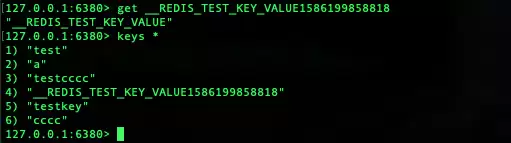 在这里插入图片描述
附:
值得注意的是,在 Spring Boot 集成过程中,我们发现 RedisSentinelConfiguration 并不能自动从 yml 配置中读取密码,需要手动调用 setPassword() 方法。这个细节若不注意,很容易导致应用启动后无法连接哨兵集群。如果你有更好的解决方案,欢迎交流探讨。
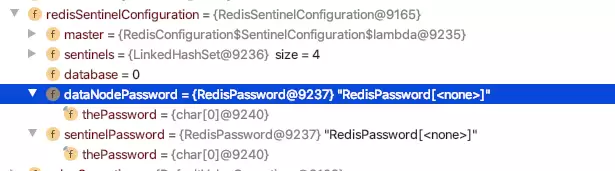 在这里插入图片描述
补充一点: 在哨兵模式下,我们无需手动监视每个主节点或从节点。启动时,主从关系由 Redis 自身的主从配置决定,哨兵会自动从当前主节点读取集群信息。当被监视的主节点不可达时,哨兵会根据 sentinel monitor 的配置选举出新的主节点,并自动更新自身配置文件。这正是哨兵模式的核心价值所在。


