
复选框(CheckBox)在Web开发中相当常见,主要用于实现多选功能,例如选择多个拒绝原因或配置项。以下示例演示如何在Ext JS中创建一个弹出窗口,供用户勾选拒绝表单的原因。
先来看效果图(UI设计较为简洁,仅供参考):
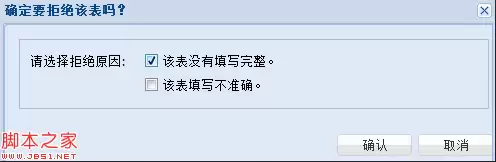
弹出窗口通过Ext.Window实现,核心代码如下:
复制代码 代码如下:
var win = new Ext.Window({ modal : true, title : '确定要拒绝该表吗?', width : 500, plain : true, items : [fp] }); win.show();
窗口内包含一个表单面板(fp),其完整定义如下,涵盖所有关键要点:
复制代码 代码如下:
var fp = Ext.create('Ext.FormPanel', { frame: true, fieldDefaults: { labelWidth: 110 }, width: 500, bodyPadding: 10, items: [ { xtype: 'fieldset', flex: 1, //title: '确定要拒绝该张表吗?', defaultType: 'checkbox', layout: 'anchor', defaults: { anchor: '100%', hideEmptyLabel: false }, items:[{ fieldLabel: '请选择拒绝原因:', boxLabel: '该表没有填写完整。', name:'integrity', inputValue: '1' }, { name:'correct', boxLabel: '该表填写不准确。', inputValue: '1' }] }], buttons: [ {text: '确认',handler: function(){ //得到完整性和准确性信息 有则为1 没有为0 if(fp.getForm().isValid()){ console.log(fp.getForm().findField('integrity').getValue()?1:0); console.log(fp.getForm().findField('correct').getValue()?1:0) } win.hide(); } },{text: '取消', handler: function(){ win.hide(); } }] });
代码中使用fieldset将两个复选框分组,并通过defaultType: 'checkbox'使子项自动成为复选框。每个复选框的name属性用于数据提交时的键名,inputValue则指定勾选后的提交值。
获取复选框的值非常简单,关键代码为以下两行:
复制代码 代码如下:
console.log(fp.getForm().findField('integrity').getValue()?1:0); console.log(fp.getForm().findField('correct').getValue()?1:0)
首先通过getForm()获取表单对象,然后使用findField定位到指定字段,最后调用getValue()获取复选框状态——勾选返回true,未勾选返回false。通过三元运算符将其转换为1或0,便于业务逻辑处理。如需获取其他复选框的值,可参照此方法。具体API细节可查阅相关文档,操作并不复杂。


