
前言
谈到文本嵌入,尤其是在RAG系统中构建检索环节时,一款兼顾速度与轻量化的工具几乎成为刚需。不可否认,市面上已有诸多选择,但今天介绍的FastEmbed,单从命名就能看出——它将“快”与“轻”深植于设计基因之中。不仅要实现高速处理,还要确保嵌入质量不打折扣。更值得一提的是,它不仅支持文本模型,也一并覆盖图像嵌入场景。
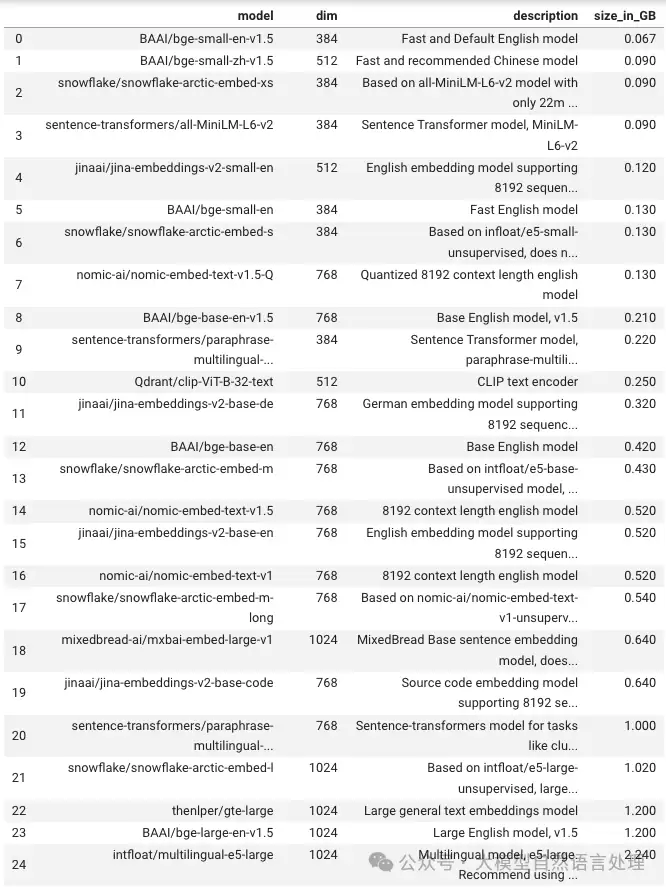
其核心特性可概括为几个关键词:
- 速度快:底层运行在ONNX Runtime之上,在大规模数据处理场景下效率出色。
- 资源省:依赖少、内存占用低,无论是云端部署、本地运行,还是边缘设备,都能流畅执行。
- 场景活:不局限于单一任务,文本分类、语义搜索、聚类分析等均可轻松应对。
- 支持GPU:提供GPU加速选项,真正实现“快上加快”。
使用指南
安装方法
安装过程非常简单,一行命令即可完成,CPU版本与GPU版本按需选择:
# CPU版
pip install fastembed

# GPU版
pip install fastembed-gpu
安装完成后,直接运行以下代码即可体验核心功能——以下示例展示了最基本的文档嵌入流程,注意返回值为生成器,取出后可直接使用:
from fastembed import TextEmbedding
from typing import List

# Example list of documents
documents: List[str] = [
    "This is built to be faster and lighter than other embedding libraries e.g. Transformers, Sentence-Transformers, etc.",
    "fastembed is supported by and maintained by Qdrant.",
]

# This will trigger the model download and initialization
embedding_model = TextEmbedding()
print("The model BAAI/bge-small-en-v1.5 is ready to use.")

embeddings_generator = embedding_model.embed(documents)  # reminder this is a generator
embeddings_list = list(embedding_model.embed(documents))
# you can also convert the generator to a list, and that to a numpy array
print(len(embeddings_list[0]) ) # Vector of 384 dimensions
密集文本嵌入
进一步来看,密集嵌入是最常用的场景。只需指定模型名称并调用embed方法,即可获得向量数组:
from fastembed import TextEmbedding

model = TextEmbedding(model_name="BAAI/bge-small-en-v1.5")
embeddings = list(model.embed(documents))

# [
#   array([-0.1115,  0.0097,  0.0052,  0.0195, ...], dtype=float32),
#   array([-0.1019,  0.0635, -0.0332,  0.0522, ...], dtype=float32)
# ]
稀疏文本嵌入
除了密集向量,FastEmbed同样支持稀疏嵌入,采用SPLADE++模型。若你的任务涉及关键词匹配或精确召回,该功能将非常实用:
from fastembed import SparseTextEmbedding

model = SparseTextEmbedding(model_name="prithivida/Splade_PP_en_v1")
embeddings = list(model.embed(documents))

# [
#   SparseEmbedding(indices=[ 17, 123, 919, ... ], values=[0.71, 0.22, 0.39, ...]),
#   SparseEmbedding(indices=[ 38,  12,  91, ... ], values=[0.11, 0.22, 0.39, ...])
# ]
图像嵌入
最后,若需要多模态处理,例如图像嵌入,FastEmbed也提供了对应模型。传入图片路径,返回结果与文本嵌入一致,均为浮点数数组:
from fastembed import ImageEmbedding

images = [
    "./path/to/image1.jpg",
    "./path/to/image2.jpg",
]

model = ImageEmbedding(model_name="Qdrant/clip-ViT-B-32-vision")
embeddings = list(model.embed(images))

# [
#   array([-0.1115,  0.0097,  0.0052,  0.0195, ...], dtype=float32),
#   array([-0.1019,  0.0635, -0.0332,  0.0522, ...], dtype=float32)
# ]